Sheen Layer
The Sheen layer can simulate the grazing coloration or rim lighting in fabrics like velvet. It can also simulate layers of dust.
|
|
Sheen Layer
|
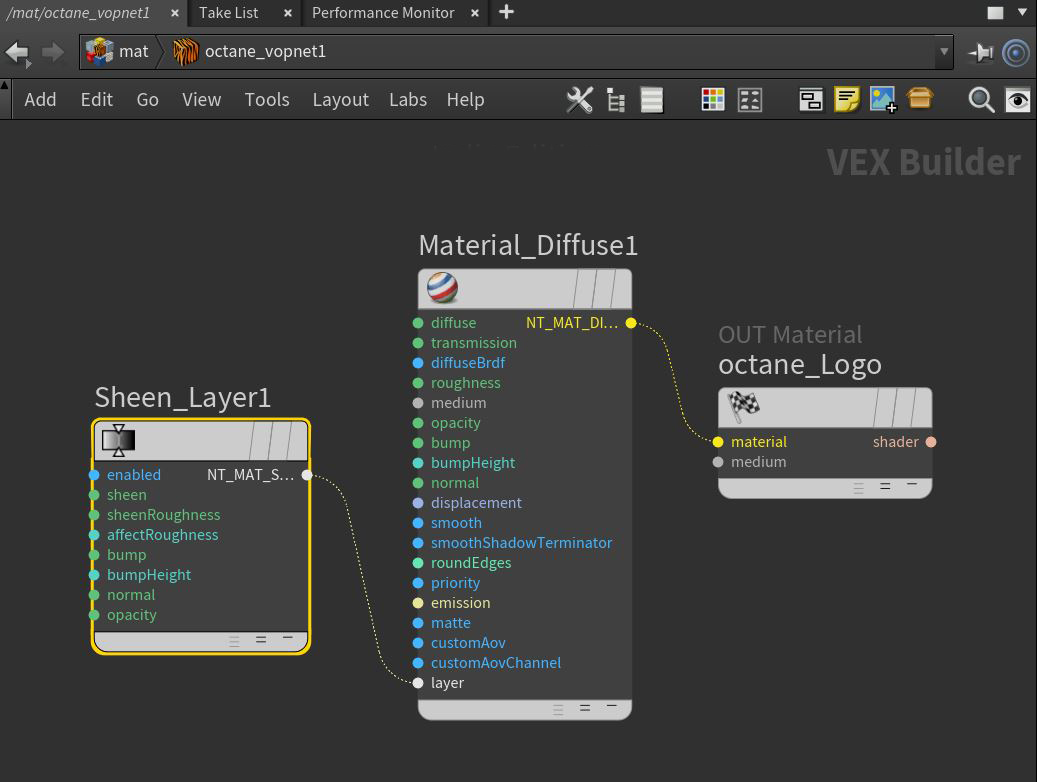
Figure 1: A Sheen Layer mode connected to the Layer pin on a Diffuse Material node
Sheen Layer Parameters
Sheen - The Sheen layer's color.
Sheen Roughness - The Sheen layer's roughness. Higher values spread the sheen color to larger parts of the surface.
Affect Roughness - The percentage of roughness affecting subsequent layer roughness.
Bump Pin - Creates fine details on the material’s surface using a Procedural or Image texture. When you connect a grayscale texture to this parameter, light areas of the texture give the appearance of protruding bumps, and dark areas create the appearance of indentation. You can adjust the bump map strength by setting the Power or Gamma values on the Image texture node. These attributes are covered in more detail under the Texture Overview section.
Bump Height - Determines the height represented by a normalized value of 1.0 in the bump texture. A vaule of 0 disables the bump map and a negative value will invert the bump map.
Normal Pin - Creates the look of fine detail on the surface. A normal map is a special type of image texture that uses red, green, and blue color values to perturb the normals of the surface at render time, thus giving the appearance of added detail. They can be more accurate than Bump maps, but require specific software such as ZBrush®, Mudbox®, Substance Designer, XnormalTM, or others to generate.
Layer Opacity - Controls the layer opacity with a slider or greyscale texture.
Compatibility Version The Octane version that the behavior of this node should match.
- Latest (2023.1.1) - Default.
- 2023.1 - The slope of bump maps is calculated slightly differently, making it more sensitive to the orientation of the UV mapping.
- 2022.1 - Legacy behavior for bump map strength is active and bump map height is ignored. This applies in addition to 2023.1 compatibility mode behavior.