Metallic Layer
The Metallic layer creates a highly reflective surface that can have colored reflections.
|
|
Metallic Layer
|

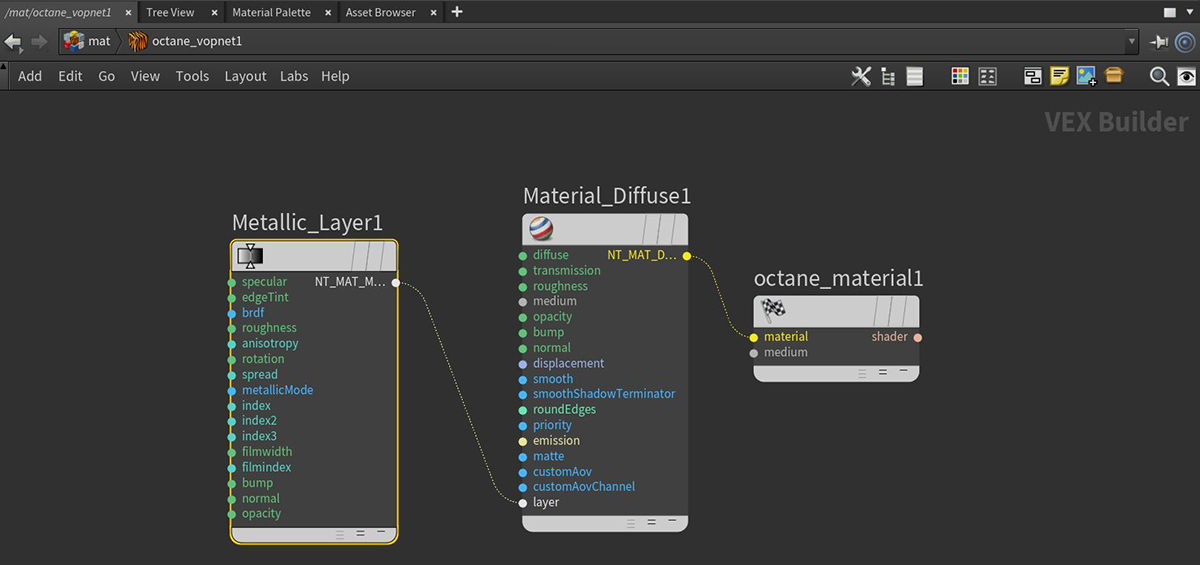
Figure 1: A Metallic Layer mode connected to the Layer pin on a Diffuse Material node
Metallic Layer Parameters
Specular - The layer's coating color.
Edge Tint - The edge of the metal's color, only used in artistic and IOR+color mode.
BRDF Model - The BRDF (Bidirectional Reflectance Distribution Function) determines the amount of light that a material reflects when light falls on it. For Glossy materials, you can choose from six BRDF models. Specific geometric properties (the micro-facet distribution) of the surface affects each BRDF, which describes the surface's microscopic shape (i.e. micro-facet normals) and scales the brightness of the BRDF's reflections.
Roughness - The Metallic layer's roughness.
Anisotropy - The Metallic layer's anisotropy. A value of -1 is horizontal, while 1 is vertical. A value of 0 is Isotropic.
Rotation - The Metallic Anisotropic reflection's rotation.
Spread - Determines the tail spread for the specualr BSDF (Bidirectional Scattering Distribution Function) model of the specular layer.
Metallic Reflection Mode - This attribute, along with the IOR attributes, provide options for controlling the Index of Refraction across a surface.
- Artistic: This mode will only use the albedo color.
- IOR + Color: This mode uses the albedo color and further adjusts the brightness of the surface using the IOR.
- RBG IOR: This is the most commonly used mode. It uses the 3 IOR values only and ignores the albedo color altogether.
IOR attributes associated with the Metallic Refl. Modes. Complex-valued Index Of Refraction controlling the Metallic reflection's Fresnel effect, where n = the refractive index, and k = the extinction coefficient. For the following parameters, the left field is the value for "n" and the right field is the value for "k."
- IOR: Complex-valued Index Of Refraction (n-k*i) which controls the Fresnel effect of the specular reflection for metallic materials. For RGB IOR mode, this serves as the Index Of Refraction for the red light (650nm).
- IOR (Green): For RGB IOR mode, this is the Index Of Refraction for the green light (550nm).
- IOR (Blue): For RGB IOR mode, this is the Index Of Refraction for the blue light (450nm).
Allow Caustics - If enabled, the photon tracing kernel will create caustics for light reflecting or transmitting through the object.
Film Width - Sets the film coating's thickness.
Film IOR - This sets the film coating's Index Of Refraction.
Bump Pin - Simulates a relief using a Greyscale texture interpreted as a Height map for the layer.
Normal Pin - Distorts the layer normals using an RGB image.
Layer Opacity - Controls the layer's opacity with a slider or greyscale texture.
Compatibility Version The Octane version that the behavior of this node should match.
- Latest (2025.1) - Default.
- 2023.1.1 - In artisitc metallic mode, a real-valued IOR is used instead of a falloff.
- 2023.1 - The slope of bump maps is calculated slightly differently, making it more sensitive to the orientation of the UV mapping.
- 2022.1 - Legacy behavior for bump map strength is active and bump map height is ignored. This applies in addition to 2023.1 compatibility mode behavior.