Quad and Sphere Light
The Quad and Sphere Spectron lights provide a more traditional light shape and surface interaction for the Spectron procedural lighting system (figure 1). Spectron offers an improved the light sampling algorithm for these light primitives. This allows for improvement in noise reduction for direct light sampling and will generally improve convergence of the image at a faster rate versus the usage of traditional mesh light sampling found in the standard Octane light type.
|
|
Sphere & Quad Spectron Lights
|

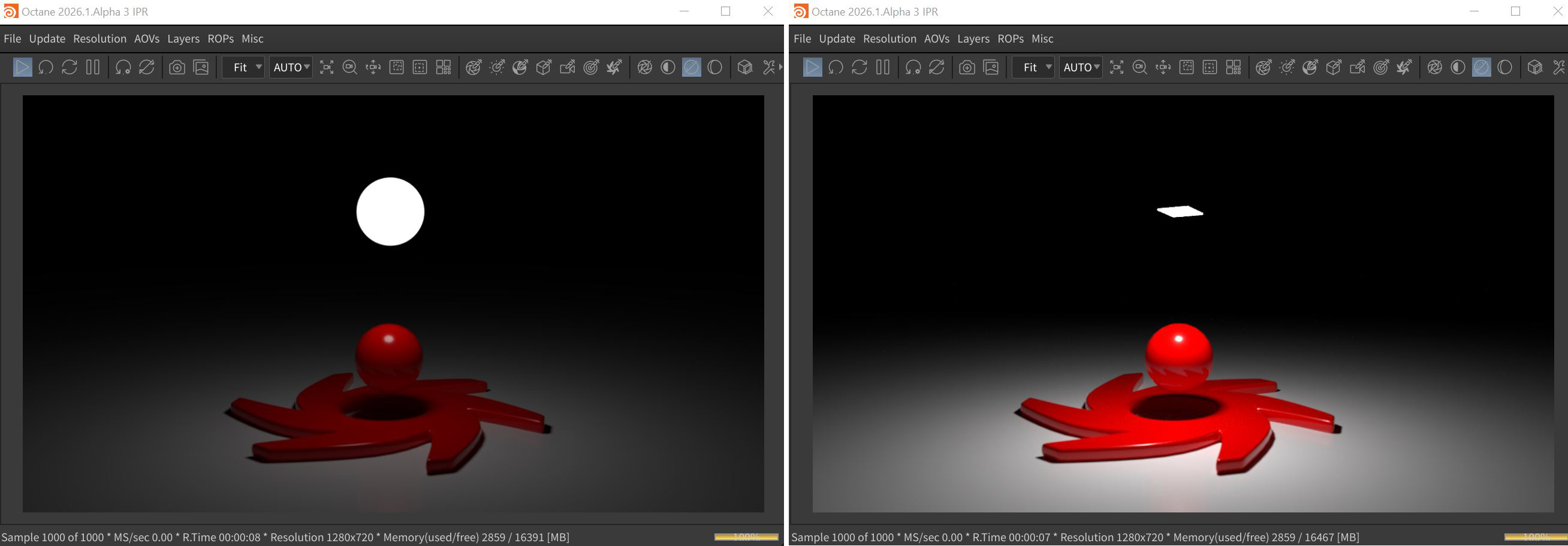
Figure 1: The Sphere and Quad Spectron lights
Transform Tab Parameters
The Transform parameters are common to all five Spectron light types.
Translate/Rotate/Scale - These parameters determine the position and orientation of the light source in the scene.
Viewing/Look At/Path Options - These tabs contain parameters for constraining a light source via a script, a path, or another object.
Light Tab Parameters
On - Turns the lioght source on or off.
Enabled in Viewports - Determines whether the lgiht source illuminates objects in the viewports.
Light Types - Determines the shape of the light source.
Shader Path - The path to the shader used for the Spectron light.
Object Layer ID - Specifies a number to be used with the Layers to Render setting in the Octane ROP node.
Object Layer Color - Specifies a color to be used with the Object Layer Color Info AOV.
Object Baking Group - This specifies what baking group the object belongs to. The value provided assigns the object to the corresponding baking. This is the first baking group by default.
General Visibility - This controls the level of visibility for both the object and its shadow.
Camera Visibility - Takes a boolean value to specify if the object is visible to the camera. This is enabled by default.
Shadow Visibility - Takes a boolean value to specify whether the shadow cast by the object is visible to the camera. This is enabled by default.
Emission Material Tab Parameters
Diffuse - Determines the surface color of the light source.
Opacity - Specifies the transparency of the light surface.
Shadow Catcher - Makes the entire lighting system a shadow catcher object.
Light Color - Determine the color of the light source.
Surface Brightness - If enabled, the surface area of the light source affects the brightness of the light.
Double Sided - Displays the lighting surface on both sides of the light.
Power - The overall brightness of the light source.
Sampling Rate - Indicates how often the light source should be sampled.
Light Pass ID - This is the ID of the light pass that captures the emitter's contribution. It works in conjunction with the Light Pass ID Render Element.
Visible on Diffuse - Enables light source visibility on diffuse surfaces. Black Body or Texture emission light sources can cast illumination or shadows on diffuse objects. Disabling this option disables emission - it's invisible in diffuse reflections, but is still visible on specular reflections. It's also excluded from the Direct light calculation. This option is enabled by default.
Visible on Specular - Enables the light source's visibility on specular surfaces, and hides emitters on specular reflections/refractions. This is enabled by default.
Cast Shadows - Enables light sources to cast light and shadows on diffuse surfaces, letting you disable direct light shadows for Mesh emitters. To make this option work, the Direct light calculation must include the emitter (the sampling rate must be greater than 0). This option is enabled by default.
Transparent Emission - Light sources cast illuminations on diffuse objects, even if the light source is on transparent material.