Octane ROP
The core of the OctaneRender® for Houdini® plugin is the Octane ROP (Render Operator). It is where most of the rendering output parameters are specified. When you click on the Octane button in the Octane shelf, OctaneRender adds the Octane ROP node to a scene (Figure 1). The Octane ROP node can be accessed from the Octane menu in the OUT network as well.
|
|
Octane ROP
|

Figure 1: Adding an Octane ROP node from the Octane menu
The Octane ROP contains a set of common parameters discussed below. The sub-tabs under the Octane Plugin Settings are discussed in their own sub-sections following this article (Figure 2).
|
|
Octane ROP
|
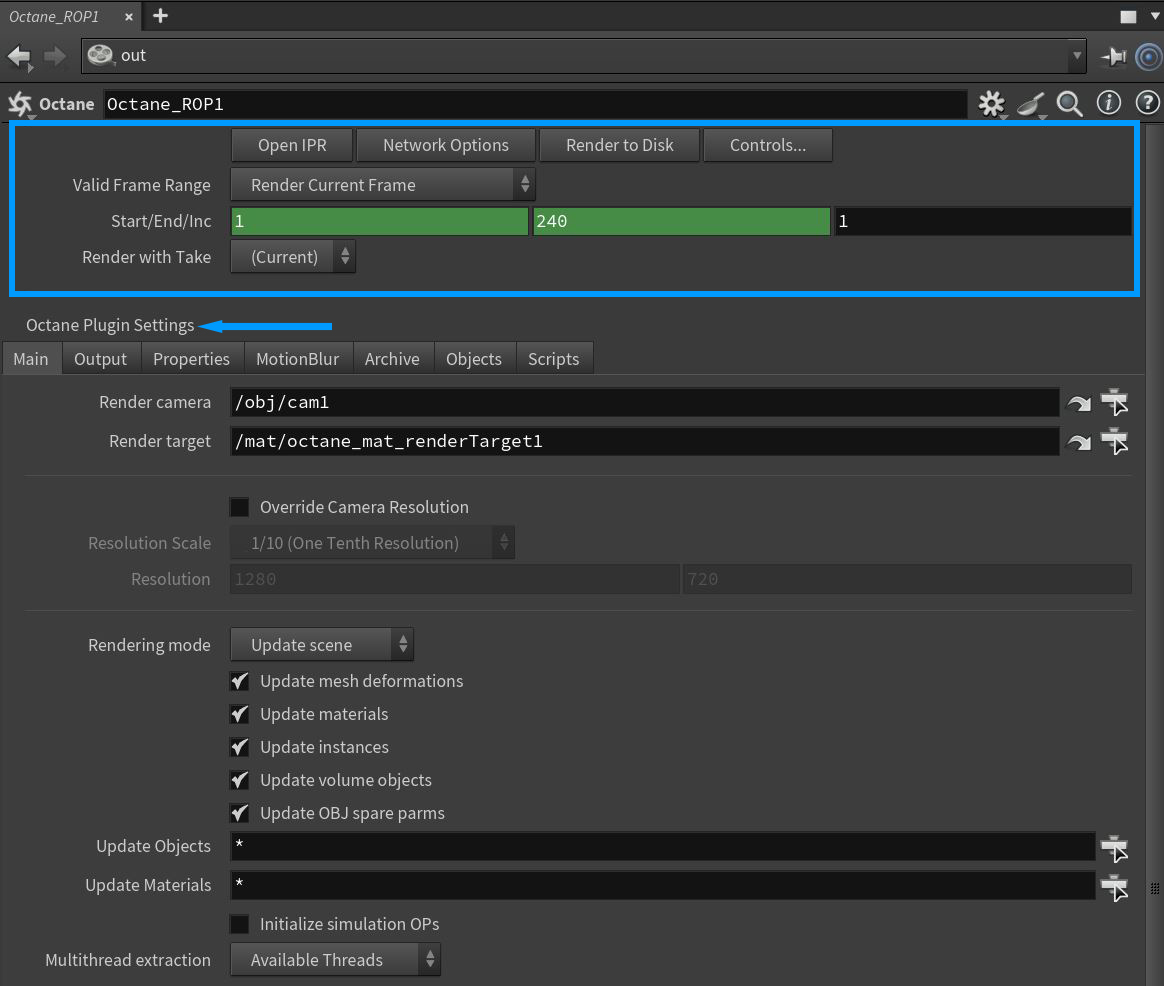
Figure 2: The Octane ROP parameters
Common Parameters
Open IPR - Opens the Octane IPR window. You can also open the IPR window from the Octane shelf.
Network Options - Opens the Octane native network rendering options panel. There are more details about network rendering in the Network Rendering section.
Render To Disk - Begins the render using the current render control settings.
Controls - Opens the Render Control dialog to adjust the render parameters before rendering.
Valid Frame Range
- Render Current Frame - Renders a single frame based on the value in the playbar or the frame that is requested by a connected Output Render node.
- Render Frame Range - Renders a sequence of frames. If an Output Render node is connected, this range is ignored in favor of frames requested by the Output Render node.
- Render Frame Range Only (Strict) - Renders a sequence of frames. If an Output Render node is connected, this range restricts its requested frames to this frame range.
Start/End/Inc - Specifies the range of frames to render (start frame, end frame, and increment). All values can be floating point values.
Render With Take - The output driver switches to this take before rendering, and then restores the current take when rendering is done.