Octane Object Parameters
The Octane Object Parameters provides a set of options to further control object settings specific to OctaneRender®. If a scene object does not have the Octane tab in the Parameters window, the Octane Object Parameters can be added by clicking on the +ObjParms button located in the Octane shelf tab (figure 1).
|
|
Object Parameters
|

Figure 1: Adding the Octane Object Parameters to a scene object
The Octane Object Parameters tab contains a dynamic set of sub-tabs. These sub-tabs will change depending on which Octane Object Type is selected. The Properties sub-tab is common to all the selected object types (figure 1).
|
|
Object Parameters
|
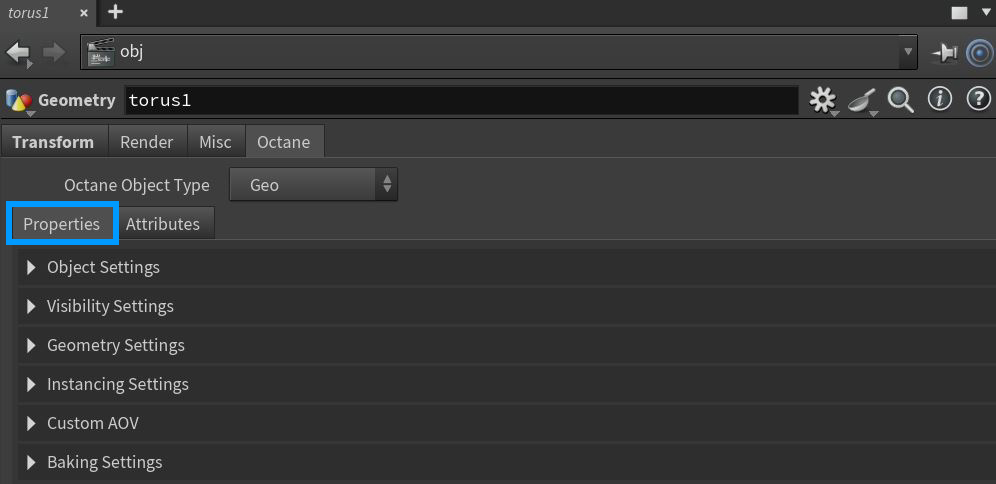
Figure 2: The common Properties sub-tab
Octane Object Parameters
This topic covers the parameters found in the Properties sub-tab common to all selected object types. Object parameters specific to each object type can be found in their associated topics wiithin this documentation.
Object Settings Rollout
Object Layer ID - Specifies the layer ID to use with the Object ID AOV.
Object Layer Color - The color used for the assigned object when it is rendered using the Object Layer Color AOV.
Custom Cryptomatte Object Node Name - Specifies a custom name to be used with the Object Node Name cryptomatte AOV.
Random Color Seed - Changes the seed value used with the Random Color shader node.
Visibility Settings Rollout
Hide Object in Render - Hides the object during the render process.
General Visibility - Provides a slider value between 0 and 1 for the object visibility.
Camera Visibility - Determines if the object's surface is visible to the camera.
Shadow Visibility - Specifies whether the object's shadows are visible to the camera.
Dirt Visibility - If enabled, the mesh will affect other meshes that are using a Dirt texture. If disbaled, any Dirt texture node will ignore that mesh.
Curvature Visibility - This option determines whether or not to sample curvature data.
Round Edges Visibility - This option determines whether or not to sample round edges data.
Light Pass Mask - Determines which Light Pass IDs will contribute to the illumination of the object for which this node is attached.
Trace Sets - This system allows for greater control over including or excluding scene data from object surfaces when light hits the surface. For more information, see the Trace Sets topic in this documentation.
Geometry Settings Rollout
Smooth Angle - Determines the angle at which an edge is considered sharp or smooth.
Tessellate NGons - Triangulates polygons with more than four sides.
Render as Tessallated Object - Tessellates non-polygon objects such as NURBS.
Subdivision Level - Adds subdivision levels at render time on the GPU to produce a smoother surface.
Convert to Meshlets - Converts scene objects to meshlets which will dynamically adjust the mesh resolution based on distance from the camera.
Instancing Settings Rollout
Packed Geo Instancing - Specifies that packed primitve geometry should be read as a instanc, not a large, individual mesh object.
Instancing MB Computed from Velocity Attribute - Provides a custom velocity attibute to an instance instead of Octane calculating the velocity on the fly.
Ignore Pivot Point Attribute - Ignores any pivot adjustment coming from a custom velocity attribute, most noticeable when using motion blur.
Custom AOV Rollout
Custom AOV - Writes a mask to the corresponding Custom AOV present in or attached to the Render Target node.
Custom AOV Channel - Determines which channels will receive the custom AOV mask.
Baking Settings Rollout
Object Baking Group - This specifies what baking group the object belongs to. The value provided assigns the object to the corresponding baking. This is the first baking group by default.
Baking UV Transform - This tells the Baking Camera how to project the UV sets of the object layer. This affects the way the UVs from that object layer are projected into the UV space when rendered using the baking camera. The value specified as baking UV transform will be used by the baking camera to place all UVs that belong to the geometry in that object layer in the UV space. This lets you bake entire scene light-maps, including all render passes in one single render without any additional compositing.