Universal
The Universal camera is a full-featured camera, with support for five different camera mode types:
- Thin lens - The default Octane camera type.
- Orthographic - Removes any perspective from the image.
- Fisheye - Ultra-wide angle/spherical result.
- Equirectangular - Special purpose format commonly used to create 360 degree renders for VR environments.
- Cubmap - Reproject the environment into a series of image rectangles within the frame composition.
When you select the Universal camera as the camera type in the Render Target's Camera tab, the following parameters are available and the tabs will change depending on the camera type selected (Figure 1).
|
|
Universal
|
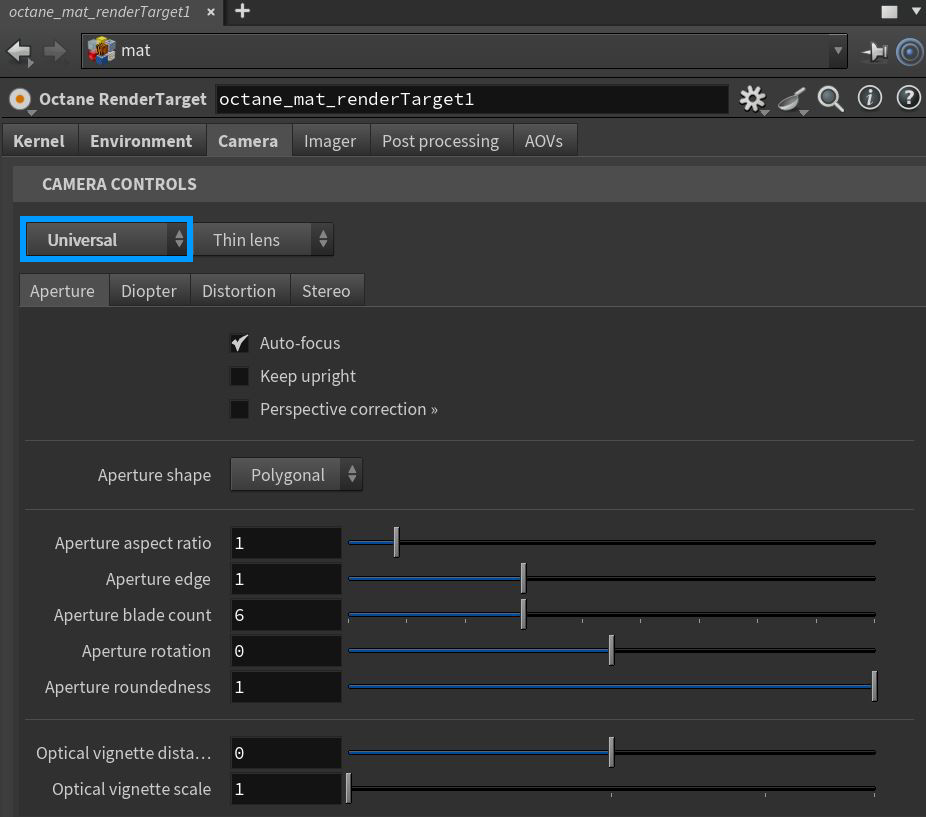
Figure 1: The Universal camera with the Thin Lens parameters
Thin Lens Parameters
Aperture Tab
Auto-Focus - Keeps the focus on the closest visible surface at the center of the image, regardless of the aperture, the aperture edge, and focal depth values. This setting is on by default.
Keep Upright - If enabled, the camera is always oriented towards the horizon and the up-vector will stay (0,1,0).
Perspective Correction - Keeps vertical lines parallel with no vertical distortion.
Aperture Shape - Controls the shape of the aperture.
Aperture Aspect Ratio - This allows users to squash and stretch the depth-of-field disc.
Aperture Edge - Modifies the relative distribution of rays across the aperture, impacting the hardness of the edges of bokeh shapes. Higher values increase the contrast towards the edge. Values between 0 and 1 simulate an apodization filter.
Aperture Blade Count - The number of blades forming the iris diaphragm.
Aperture Rotation - The rotation of the aperture shape in degrees.
Aperture Roundedness - The roundness of the blades forming the iris diaphragm.
Optical Vignette Distance - The distance between the lens and the opening of the lens barrel.
Optical Vignette Scale - The scale of the opening of the lens barrel relative to the aperture.
Diopter Tab
Enable Split-Focus Diopter - Enables the split-focus diopter.
Diopter Rotation - Rotation of the split-focus diopter in degrees.
Diopter Translation - Translation of the split-focus diopter.
Diopter Boundary Width - Width of the boundary between the two fields.
Diopter Boundary Falloff - Controls how quickly the Split-Focus diopter focal depth blends into the main focal depth.
Show Diopter Guide - Displays guide lines, toggling this option on or off will restart the render.
Distortion Tab
Spherical Distortion - The amount of spherical distortion.
Barrel Distortion - Straight lines appear curved.
Barrel Distortion Corners - Straight lines appear curved, affecting corners.
Spherical Aberration - Rays hitting the edge of the lens focus closer to the lens.
Coma - Rays hitting the lens edge have a larger field of view.
Astigmatism - Sagittal and tangential rays focus at different distances from the lens.
Field Curvature - The curvature of the plane in focus.
Use Distortion Texture - Enables the distortion texture.
Stereo Tab
Stereo Output - This specifies the output rendered in stereo.
- Left - Renders the left eye's image.
- Right - Renders the right eye's image.
- Side-By-Side - Renders the scene as a pair of two-dimensional images.
- Anaglyphic - When active, the render can be viewed with red/blue 3D glasses.
- Over-Under - The pair of two dimensional images is placed on top of each other for special viewers.
Stereo Mode - Choose Off-Axis or Parallel stereo camera projections.
Eye Distance - The distance between the left and the right eye in stereo mode, measured in meters. The stereo distance is also referred to as the IPD (interpupillary distance), or stereo interocular distance or eye distance. For realistic depth, use values between 0.055 and 0.075.
Swap Eyes - Swaps the left and right eyes in the rendering.
Left/Right Stereo Filter - The left and right filter colors adjust the colors for the anaglyphic stereo effect in the render.
Orthographic Parameters
Aperture Tab
Auto-Focus - Keeps the focus on the closest visible surface at the center of the image, regardless of the aperture, the aperture edge, and focal depth values. This setting is on by default.
Keep Upright - If enabled, the camera is always oriented towards the horizon and the up-vector will stay (0,1,0).
Perspective Correction - Keeps vertical lines parallel with no vertical distortion.
Aperture Shape - Controls the shape of the aperture.
Aperture Aspect Ratio - This allows users to squash and stretch the depth-of-field disc.
Aperture Edge - Modifies the relative distribution of rays across the aperture, impacting the hardness of the edges of bokeh shapes. Higher values increase the contrast towards the edge. Values between 0 and 1 simulate an apodization filter.
Aperture Blade Count - The number of blades forming the iris diaphragm.
Aperture Rotation - The rotation of the aperture shape in degrees.
Aperture Roundedness - The roundness of the blades forming the iris diaphragm.
Optical Vignette Distance - The distance between the lens and the opening of the lens barrel.
Optical Vignette Scale - The scale of the opening of the lens barrel relative to the aperture.
Diopter Tab
Enable Split-Focus Diopter - Enables the split-focus diopter.
Diopter Rotation - Rotation of the split-focus diopter in degrees.
Diopter Translation - Translation of the split-focus diopter.
Diopter Boundary Width - Width of the boundary between the two fields.
Diopter Boundary Falloff - Controls how quickly the Split-Focus diopter focal depth blends into the main focal depth.
Show Diopter Guide - Displays guide lines, toggling this option on or off will restart the render.
Stereo Tab
Stereo Output - This specifies the output rendered in stereo.
- Left - Renders the left eye's image.
- Right - Renders the right eye's image.
- Side-By-Side - Renders the scene as a pair of two-dimensional images.
- Anaglyphic - When active, the render can be viewed with red/blue 3D glasses.
- Over-Under - The pair of two dimensional images is placed on top of each other for special viewers.
Stereo Mode - Choose Off-Axis or Parallel stereo camera projections.
Eye Distance - The distance between the left and the right eye in stereo mode, measured in meters. The stereo distance is also referred to as the IPD (interpupillary distance), or stereo interocular distance or eye distance. For realistic depth, use values between 0.055 and 0.075.
Swap Eyes - Swaps the left and right eyes in the rendering.
Left/Right Stereo Filter - The left and right filter colors adjust the colors for the anaglyphic stereo effect in the render.
Fisheye Parameters
Aperture Tab
Auto-Focus - Keeps the focus on the closest visible surface at the center of the image, regardless of the aperture, the aperture edge, and focal depth values. This setting is on by default.
Keep Upright - If enabled, the camera is always oriented towards the horizon and the up-vector will stay (0,1,0).
Perspective Correction - Keeps vertical lines parallel with no vertical distortion.
Aperture Shape - Controls the shape of the aperture.
Aperture Aspect Ratio - This allows users to squash and stretch the depth-of-field disc.
Aperture Edge - Modifies the relative distribution of rays across the aperture, impacting the hardness of the edges of bokeh shapes. Higher values increase the contrast towards the edge. Values between 0 and 1 simulate an apodization filter.
Aperture Blade Count - The number of blades forming the iris diaphragm.
Aperture Rotation - The rotation of the aperture shape in degrees.
Aperture Roundedness - The roundness of the blades forming the iris diaphragm.
Optical Vignette Distance - The distance between the lens and the opening of the lens barrel.
Optical Vignette Scale - The scale of the opening of the lens barrel relative to the aperture.
Diopter Tab
Enable Split-Focus Diopter - Enables the split-focus diopter.
Diopter Rotation - Rotation of the split-focus diopter in degrees.
Diopter Translation - Translation of the split-focus diopter.
Diopter Boundary Width - Width of the boundary between the two fields.
Diopter Boundary Falloff - Controls how quickly the Split-Focus diopter focal depth blends into the main focal depth.
Show Diopter Guide - Displays guide lines, toggling this option on or off will restart the render.
Fisheye Tab
Fisheye Type - Choose between covering the lens circle in the sensor, or covering the whole sensor.
Fisheye Projection - The projection function used for the fisheye.
Hard Vignette - Renders the lens (Circular fisheye only).
Fisheye Angle - The camera's field of view, measured in degrees.
Stereo Tab
Stereo Output - This specifies the output rendered in stereo.
- Left - Renders the left eye's image.
- Right - Renders the right eye's image.
- Side-By-Side - Renders the scene as a pair of two-dimensional images.
- Anaglyphic - When active, the render can be viewed with red/blue 3D glasses.
- Over-Under - The pair of two dimensional images is placed on top of each other for special viewers.
Stereo Mode - Choose Off-Axis or Parallel stereo camera projections.
Eye Distance - The distance between the left and the right eye in stereo mode, measured in meters. The stereo distance is also referred to as the IPD (interpupillary distance), or stereo interocular distance or eye distance. For realistic depth, use values between 0.055 and 0.075.
Swap Eyes - Swaps the left and right eyes in the rendering.
Left/Right Stereo Filter - The left and right filter colors adjust the colors for the anaglyphic stereo effect in the render.
Equirectangular Parameters
Aperture Tab
Auto-Focus - Keeps the focus on the closest visible surface at the center of the image, regardless of the aperture, the aperture edge, and focal depth values. This setting is on by default.
Keep Upright - If enabled, the camera is always oriented towards the horizon and the up-vector will stay (0,1,0).
Perspective Correction - Keeps vertical lines parallel with no vertical distortion.
Aperture Shape - Controls the shape of the aperture.
Aperture Aspect Ratio - This allows users to squash and stretch the depth-of-field disc.
Aperture Edge - Modifies the relative distribution of rays across the aperture, impacting the hardness of the edges of bokeh shapes. Higher values increase the contrast towards the edge. Values between 0 and 1 simulate an apodization filter.
Aperture Blade Count - The number of blades forming the iris diaphragm.
Aperture Rotation - The rotation of the aperture shape in degrees.
Aperture Roundedness - The roundness of the blades forming the iris diaphragm.
Optical Vignette Distance - The distance between the lens and the opening of the lens barrel.
Optical Vignette Scale - The scale of the opening of the lens barrel relative to the aperture.
Equirectangular Tab
Horizontal Field of View - The horizontal field of view, in degrees. This sets the X-coordinate for the camera's horizontal field of view in the scene. This is ignored when cube mapping is used.
Vertical Field of View - The vertical field of view, in degrees. This sets the Y-coordinate for the camera's vertical field of view in the scene. This is ignored when cube mapping is used.
Stereo Tab
Stereo Output - This specifies the output rendered in stereo.
- Left - Renders the left eye's image.
- Right - Renders the right eye's image.
- Side-By-Side - Renders the scene as a pair of two-dimensional images.
- Anaglyphic - When active, the render can be viewed with red/blue 3D glasses.
- Over-Under - The pair of two dimensional images is placed on top of each other for special viewers.
Stereo Mode - Choose Off-Axis or Parallel stereo camera projections.
Eye Distance - The distance between the left and the right eye in stereo mode, measured in meters. The stereo distance is also referred to as the IPD (interpupillary distance), or stereo interocular distance or eye distance. For realistic depth, use values between 0.055 and 0.075.
Swap Eyes - Swaps the left and right eyes in the rendering.
Left/Right Stereo Filter - The left and right filter colors adjust the colors for the anaglyphic stereo effect in the render.
Cubemap Parameters
Aperture Tab
Auto-Focus - Keeps the focus on the closest visible surface at the center of the image, regardless of the aperture, the aperture edge, and focal depth values. This setting is on by default.
Keep Upright - If enabled, the camera is always oriented towards the horizon and the up-vector will stay (0,1,0).
Perspective Correction - Keeps vertical lines parallel with no vertical distortion.
Aperture Shape - Controls the shape of the aperture.
Aperture Aspect Ratio - This allows users to squash and stretch the depth-of-field disc.
Aperture Edge - Modifies the relative distribution of rays across the aperture, impacting the hardness of the edges of bokeh shapes. Higher values increase the contrast towards the edge. Values between 0 and 1 simulate an apodization filter.
Aperture Blade Count - The number of blades forming the iris diaphragm.
Aperture Rotation - The rotation of the aperture shape in degrees.
Aperture Roundedness - The roundness of the blades forming the iris diaphragm.
Optical Vignette Distance - The distance between the lens and the opening of the lens barrel.
Optical Vignette Scale - The scale of the opening of the lens barrel relative to the aperture.
Cubemap Tab
Cubemap Layout - Determines the configuration for laying out the cubemap.
Equi-angular Cubemap - Activates an equi-angular cubemap projection.
Stereo Tab
Stereo Output - This specifies the output rendered in stereo.
- Left - Renders the left eye's image.
- Right - Renders the right eye's image.
- Side-By-Side - Renders the scene as a pair of two-dimensional images.
- Anaglyphic - When active, the render can be viewed with red/blue 3D glasses.
- Over-Under - The pair of two dimensional images is placed on top of each other for special viewers.
Stereo Mode - Choose Off-Axis or Parallel stereo camera projections.
Eye Distance - The distance between the left and the right eye in stereo mode, measured in meters. The stereo distance is also referred to as the IPD (interpupillary distance), or stereo interocular distance or eye distance. For realistic depth, use values between 0.055 and 0.075.
Swap Eyes - Swaps the left and right eyes in the rendering.
Left/Right Stereo Filter - The left and right filter colors adjust the colors for the anaglyphic stereo effect in the render.