Realistic
OctaneRender® 2025 contains a new Realistic Lens camera type. The realistic lens camera produces aberrations and other effects similar to real glass camera lenses. When you select the Realistic Lens camera as the camera type in the Render Target's Camera tab, the following parameters are available and the tabs will change depending on the camera type selected (Figure 1).
|
|
Realistic Lens
|
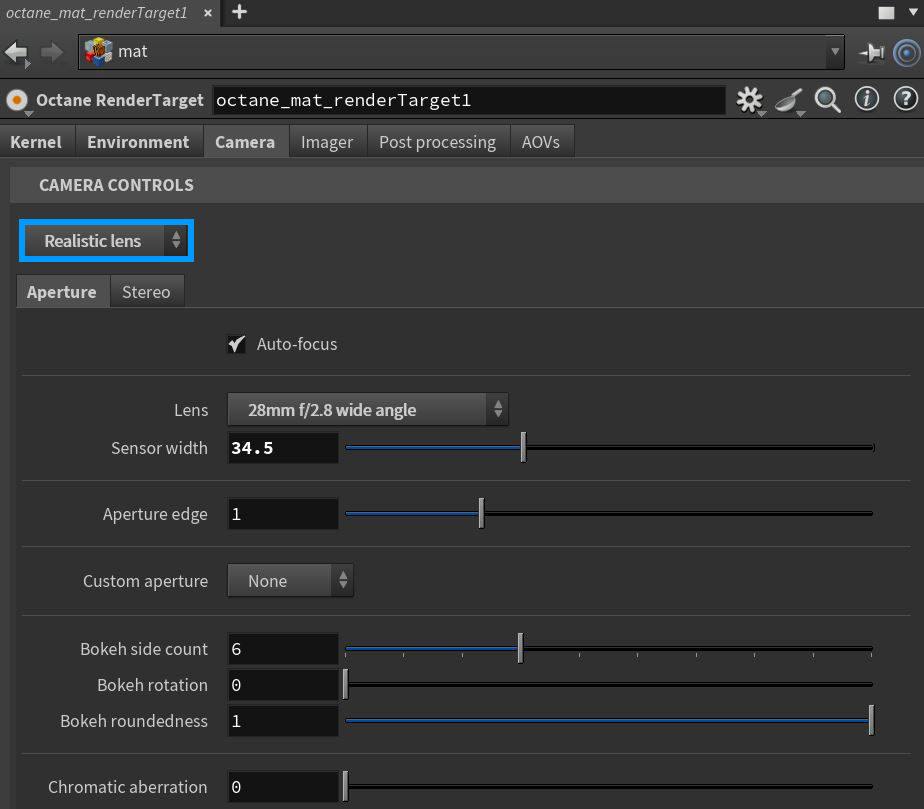
Figure 1: The Realistic Lens parameters
Realistic Lens Parameters
Aperature Tab
Auto-Focus - If enabled, focus is kept on the closest visible surface at the center of the image, regardless of the Aperture, Aperture Edge, and Focal Depth values.
Lens - Provides a list of lens types to choose.
Sensor Width - Sets the dimensions of the sensor which affects the field of view combine with focal length.
Aperture Edge - This controls aperture edge detection at all points within the aperture. Lower values give more pronounced edges to out-of-focus objects affected by a shallow depth-of-field. Aperture Edge modifies the bokeh effect of the depth-of-field. High values increase the contrast towards the edge.
Custom Aperture - Provides an option to add a custom shape to the aperture.
Bokeh Side Count - The number of edges that make up the bokeh shape.
Bokeh Rotation - The bokeh shape's orientation.
Bokeh Roundedness - Determines the roundness of the bokeh edges.
Chromatic Aberration - Determines the strength of the chromatic aberration effect. 0% produces no effect and 100% creates a realistic effect. Any amount above 100% results in an exaggerated effect.
Stereo Tab
Stereo Output - This specifies the output rendered in stereo.
- Left - Renders the left eye's image.
- Right - Renders the right eye's image.
- Side-By-Side - Renders the scene as a pair of two-dimensional images.
- Anaglyphic - When active, the render can be viewed with red/blue 3D glasses.
- Over-Under - The pair of two dimensional images is placed on top of each other for special viewers.
Stereo Mode - Choose Off-Axis or Parallel stereo camera projections.
Eye Distance - The distance between the left and the right eye in stereo mode, measured in meters. The stereo distance is also referred to as the IPD (interpupillary distance), or stereo interocular distance or eye distance. For realistic depth, use values between 0.055 and 0.075.
Swap Eyes - Swaps the left and right eyes in the rendering.
Left/Right Stereo Filter - The left and right filter colors adjust the colors for the anaglyphic stereo effect in the render.