Panoramic
The Panoramic camera is used to create 360, VR or Dome Mapping. When you select Panoramic as the camera type in the Render Target's Camera tab, the following parameters are available (Figure 1).
|
|
Panoramic
|

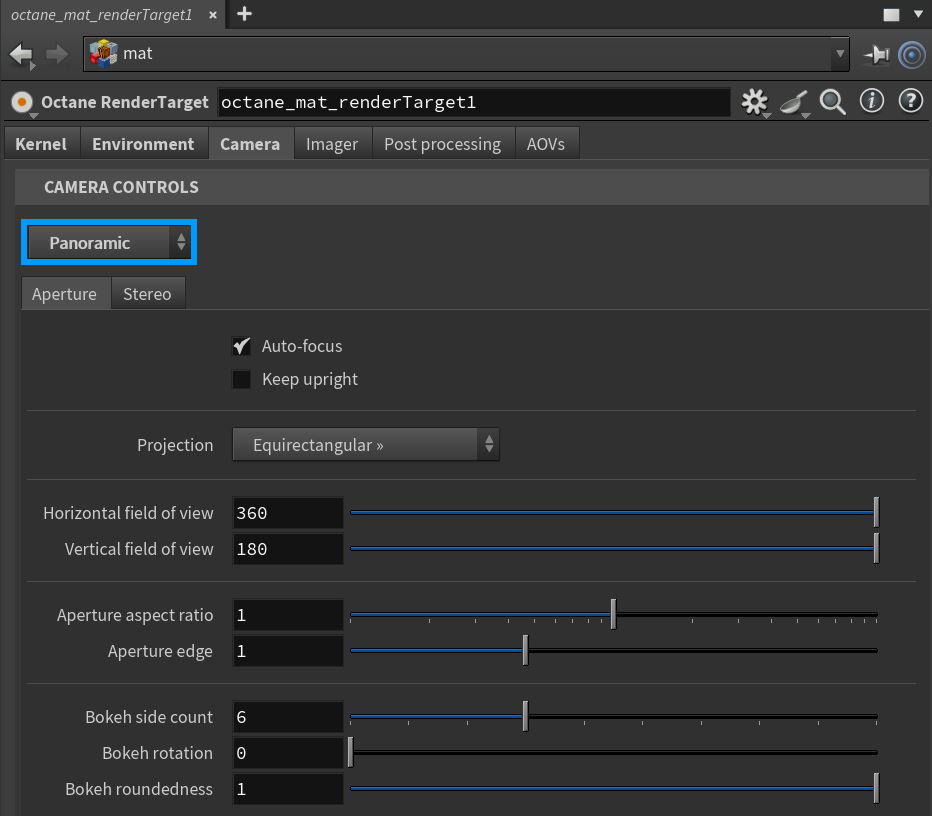
Figure 1: The Panoramic camera parameters
Panoramic Camera Parameters
Aperture Tab
Auto-Focus - The focus is kept on the closest visible surface at the center of the image, regardless of the Aperture, Aperture Edge, and Focal Depth values.
Keep Upright - The panoramic camera is always oriented towards the horizon, and the up vector stays in its default vertical direction.
Projection - Specifies the Panoramic projection to use, with options for Spherical, Cylindrical, or Cube Map.
Horizontal Field of View - The horizontal field of view in degrees. This sets the x-coordinate for the camera's horizontal field of view. This is ignored when Cube Mapping is enabled.
Vertical Field Of View - The vertical field-of-view in degrees. This sets the y-coordinate for the camera's vertical field of view. This is ignored when Cube Mapping is enabled.
Aperture Aspect Ratio - Squash or stretch the depth-of-field disc, effectively enhancing the depth of field blur with higher values.
Aperture Edge - This controls aperture edge detection at all points within the aperture. Lower values will give more pronounced edges to out-of-focus objects affected by a shallow depth-of-field. Aperture Edge modifies the depth-of-field's bokeh effect. High values increase the contrast towards the edge.
Bokeh Side Count - Adjusts the number of edges that make up the Bokeh shape.
Bokeh Rotation - The orientation of the Bokeh shape.
Bokeh Roundedness - Determines the roundness of the Bokeh edges.
Stereo Tab
Stereo Output - This specifies the output rendered in stereo.
- Left - Renders the left eye's image.
- Right - Renders the right eye's image.
- Side-By-Side - Renders the scene as a pair of two-dimensional images.
- Anaglyphic - When active, the render can be viewed with red/blue 3D glasses.
- Over-Under - The pair of two dimensional images is placed on top of each other for special viewers.
Eye Distance - This is the distance between the left and right eye in Stereo mode, measured in meters. The stereo distance is also referred to the IPD (Inter Pupillary Distance), AKA stereo interocular distance or eye distance. For realistic depth, use values between 0.055 and 0.075.
Eye Distance Falloff - Controls how quickly the eye distance gets reduced towards the poles. This helps to reduce eye strain at the poles when the panorama is viewed in an HMD.
Pano Blackout Latitude - The +/- latitude at which the panorama gets cut off, when stereo rendering is enabled.
Left/Right Stereo Filter - The left and right filter colors adjust the colors for the Anaglyphic stereo effect in the render.
Swap Eyes - Swaps the left and right eyes in the rendering.