Mediums And Volumes
In OctaneRender®, Mediums determine the way photons enter a surface and are either scattered, absorbed, or both, before exiting the surface or volume. Mediums allow you to create virtually any light-absorbent material with OctaneRender.
When light penetrates an object or traverses an apparent void, it will impart some of its energy to the surroundings. This can be apparent on a partially cloudy day, as light beams stream through the clouds, or when you hold a light up to your hand and observe the glow from your skin. In some cases, this phenomenon is referred to as sub-surface scattering (SSS) ; the behavior of light as it is absorbed and scattered within solid objects such as skin, candles, wax and so on. Other cases, such as the cloudy day example, dust, smoke and so on, are referred to as volumetric effects.
These settings are stored in Medium nodes, which are attached to the corresponding input pins of Diffuse, Specular, Universal, Standard Surface, or Null material nodes.
There are five primary types of medium nodes:
- Scattering - A comprehensive node with parameters for absorption, scattering, and emission.
- Random Walk - A newer variant of subsurface scattering that provides a more realistic result.
- Absorption - A simple version with just absorption parameters.
- Standard Volume Medium - A comprehensive node with the flexibility to specify what VDB grid data can be used for the various node channels. This node's usage is covered further under the Volumes section of this manual.
- Volume Medium - Used on volumetric surfaces such as smoke and clouds. It requires a VDB file to create the volume objects. For more information, visit http://www.openvdb.org/.
- Volume Ramp - Designed to work in conjunction with a Volume Medium. It requires a VDB file to create the volume objects.
Rendering a medium requires the Path Tracing or PMC kernel, with a large Maxdepth setting. For Diffuse materials, you can use the Direct Light kernel with Diffuse mode set to GI. The medium nodes can be found in the Medium category when right-clicking in an Octane VOP NET (Figure 1).
|
|
MEdiums & Volumes
|
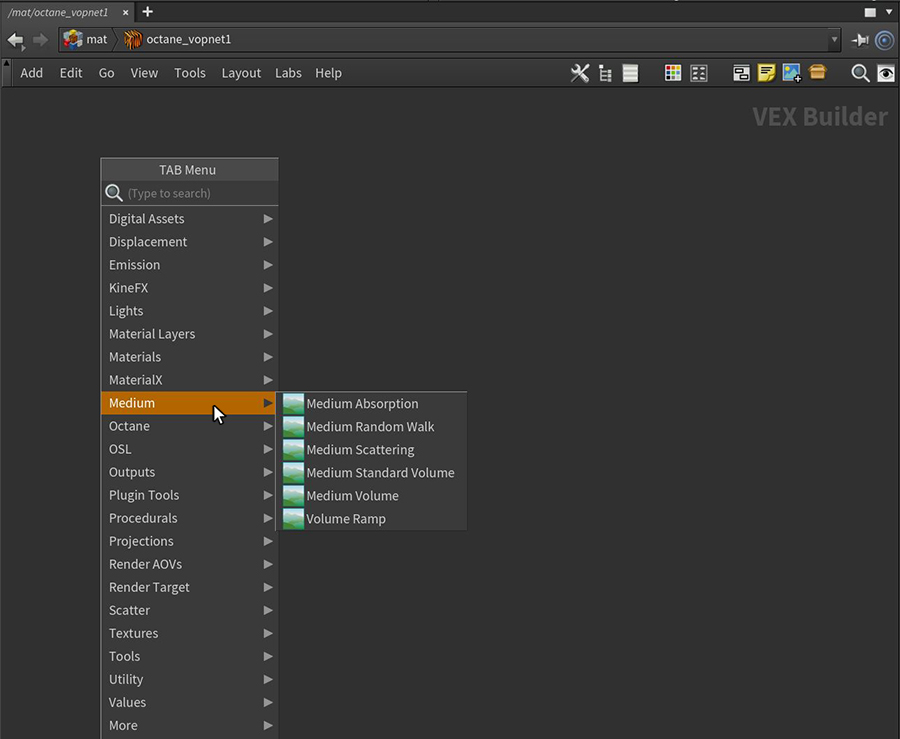
Figure 1: Accessing the Medium nodes in an Octane VOP network
Medium Tips
- Any Octane material type that features a medium port or pin can be used to create sub-surface scattering with mediums.
- Diffuse - Can be used but dialing in the parameters can be difficult as more energy is lost (absorbed) within the material.
- Specular - This is the most evident and easiest to control, as it light will pass through specular materials in the most efficient manner, losing very little of its energy. Specular materials can be the best way to show sub-surface scattering with thicker objects. For Random Walk scattering, Fake Shadows will need to be enabled in order to see the effect, as Random Walk will only do indirect sampling in that case.The Transmission parameter should be set to white.
- Standard Surface - This material will need it's Transmission type set to white in order for any medium effects to be present.
- Universal - This material type will needs it's Transmission type set to white via a Color RGB node connected to the Transmission input pin.
- Null - This material type can be used with mediums but it is more suited for use with volumes that have no actual surface.
- Objects should be closed (watertight, no holes).
- Single-sided objects will not work.
- Keep material reflection values low; if reflection is too high, not enough rays enter the object.
- Absorption and scattering phenomena coexist in nature. These two options work together for the most realistic results.
In the physical world, if the Absorption attribute use a color, the light transmitted through the surface is shaded as the complementary color (figure 2).
|
|
mediums aborption scatter
|
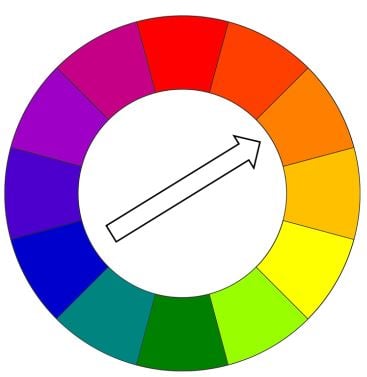
Figure 2 : A diagram shows that complementary colors are opposite each other on the color wheel
|
NOTE By default, Invert Absorption is active in the Absorption and Scattering nodes which will make the these real-world physical characteristics behave in an opposite fashion. For example: If blue is specified as the absorption color, the transmitted light will be blue. |