Random Walk
The Random Walk node is a newer variant of subsurface scattering that utilizes a stochastic or random process for the scattering of light through an object. This provides the most realistic result when rendering scatter volumes and is capable of maintaining more skin surface detail when used as a subsurface scattering method for skin compared to the traditional Scattering medium node. Random Walk takes in an albedo texture for specifying the expected SSS color, as opposed to the traditional absorption/scattering color spectrum in other medium nodes. You can also specify a color radius texture, which represents how far the light scatters into the medium (figure 1)
|
|
Random Walk
|
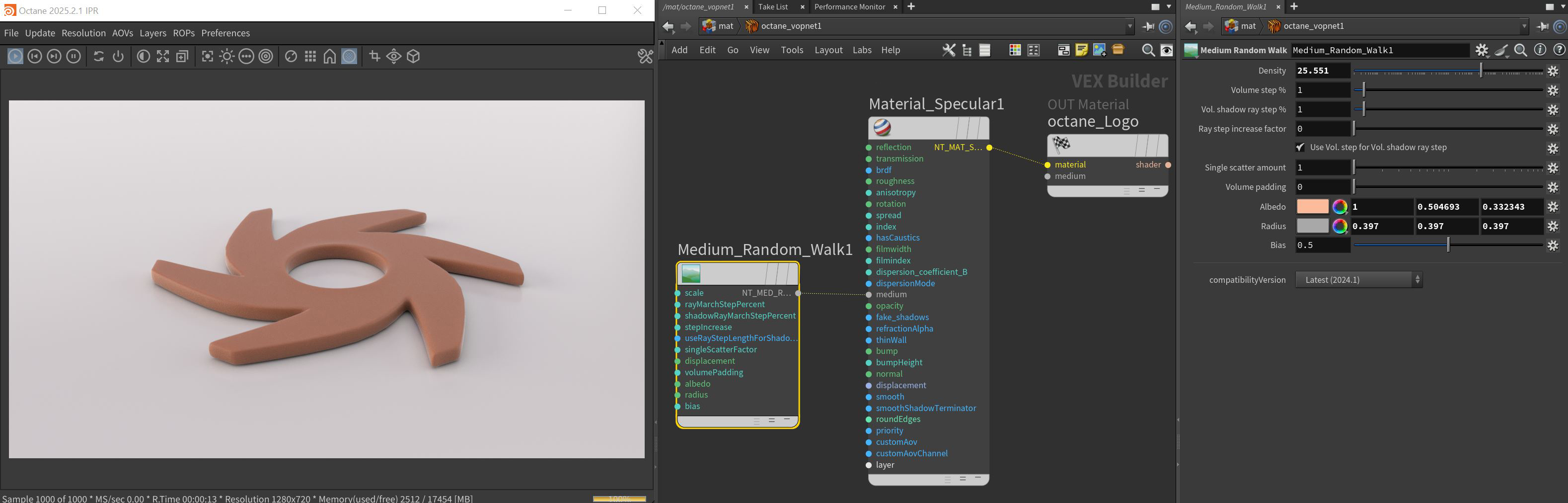
Figure 1: The Random Walk Medium used to create a waxy or skin-like surface
Random Walk Parameters
Density - Determines the density of the particles in the surface. The larger the scale value, the more likely light will be absorbed when passing through the surface.
Volume Step % - Depending on the surface, you may need to adjust this parameter as it is specified as a percentage of the voxel size. The default value is 100%, but if the volume is smaller than this, you need to decrease the value. Decreasing this value decreases render speed, and increasing the value causes the ray marching algorithm to take longer steps. If the Volume Step % exceeds the volume's dimensions, then the ray marching algorithm takes a single step through the whole volume. To get the most accurate results, keep Volume Step % as small as possible.
Volume Shadow Ray Step % - Step length that is used by the shadow ray for marching through volumes.
Ray Step Increase Factor - Determines how fast the volume ray step will increase.
Use Volume Step Length for Volume Shadow Ray Step Length - Check box for using the Volume Step Length for the Volume Shadow Ray Step Length as well.
Single Scatter Amount - Determines how often direct light is calculated in volumes, as a ratio of scatter events.
Displacement Pin - Allows a texture to control a volume's sample positions displacement.
Albedo - Determines the color that is being scattered.
Radius - Determines the depth that the light scatters in the medium where black provides no scattering and white fully scatters. A color node or a float value can be used with this attribute as well. A color node's Value amount plays an important roll with this attribute. A darker value will scatter this color less and a lighter value will scatter this color more.
Bias - Lower values will bias towards the albedo color and higher values will bias towards the radius color.
Compatibility Version The Octane version that the behavior of this node should match.
- Latest (2024.1) - Default.
- 2023.1 - The volume ray marching step length is an absolute length and the voxel size is ignored.