Scattering
The Scattering medium node is used to create the look of subsurface scattering. This is the phenomena where light rays enter a surface, are scattered within the material of surface, and then exit again. It is the key to creating the look of realistic human skin and other organic surfaces. In the figure 1, the absorption color is being strongly scattered with a scattering value of 0.5 (middle gray).
|
|
Scattering
|
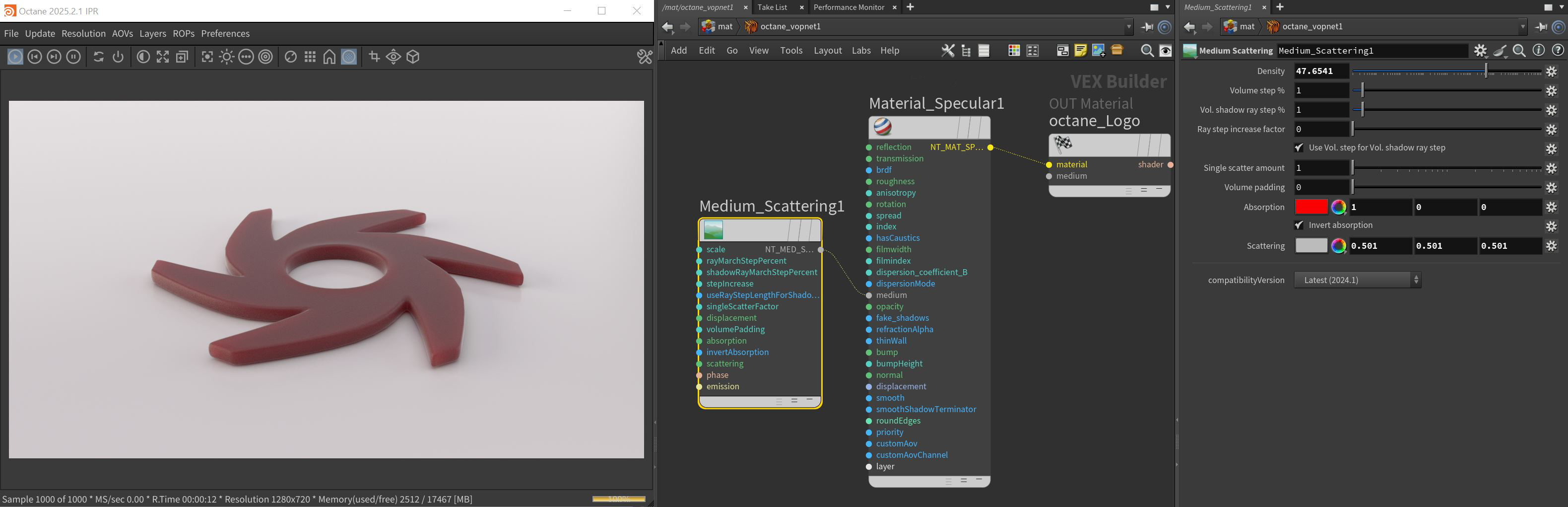
Figure 1: The Scattering medium attributes, which include an Absorption attribute similar to the Absorption medium
Scattering Parameters
Density - Controls the overall density of the medium. Higher values absorb and scatter more light and will result in more of the specified absorption and scatter color being visible (Figure 2).
|
|
Scattering
|

Figure 2: Increasing the Density parameter with red specified as the scatter color
Volume Step % - Depending on the surface, you may need to adjust this parameter as it is specified as a percentage of the voxel size. The default value is 100%, but if the volume is smaller than this, you need to decrease the value. Decreasing this value decreases render speed, and increasing the value causes the ray marching algorithm to take longer steps. If the Volume Step % exceeds the volume's dimensions, then the ray marching algorithm takes a single step through the whole volume. To get the most accurate results, keep Volume Step % as small as possible.
Volume Shadow Ray Step % - Step length that is used by the shadow ray for marching through volumes.
Ray Step Increase Factor - Determines how fast the volume ray step will increase.
Use Volume Step Length for Volume Shadow Ray Step Length - Check box for using the Volume Step Length for the Volume Shadow Ray Step Length as well.
Single Scatter Amount - Determines how often direct light is calculated in volumes, as a ratio of scatter events.
Displacement Pin - Allows a texture to control a volume's sample positions displacement.
Volume Padding - Expands the volume bounding box by the given percentage in all six directions, but only if sample position displacement is being used.
Absorption - By default, the absorption attribute is controlled by a value slide ranging from 0 - 1 where 0 is no absorption and 1 is full absorption. A color or texture can be added to replace the value slider. The color's value and saturation can be used to further determine the absorption amount. Note: If the Invert Absorption attribute is active, these values will be behave in the opposite fashion, for example: white or a value of 1 has no absorption and black or a value of 0 has full absorption (figure 3).
|
|
Scattering
|

Figure 3: White or a value of 1 (left) and black or a value of 0 (right)
Invert Absorption - Inverts the absorption characteristics so that the absorption color specified is the same color seen in the surface. For example: Red results in red, otherwise, red would result in green (if this check box is inactive).
Scattering - Determines how quickly light scatters as it moves through the surface. High values mean that light scatters sooner as it enters the surface, and low values mean that light passes deeper into the surface before it scatters. By default, the scattering attribute is controlled by a value slide ranging from 0 - 1 where 0 is no scattering and 1 is full scattering. A color or texture can be added to replace the value slider. The color's value and saturation can be used to further determine the scatter amount.
Phase Pin - Controls the direction of the light as it scatters in the surface. A value of 0 results in light scattering equally in all directions. Positive values result in forward scattering, where the photons continue in the same direction they were going when they entered the surface. Negative values result in backwards scattering, where the light moves through the surface in the direction opposite to the angle at which the light entered the surface. To achieve this level of control, a Phase Schlick node should be added here.
Emission Pin - This parameter allows the volume to emit or generate its own illumination.
Compatibility Version The Octane version that the behavior of this node should match.
- Latest (2024.1) - Default.
- 2023.1 - The volume ray marching step length is an absolute length and the voxel size is ignored.