Material Standard Surface
The Standard Surface material closely aligns with the Autodesk Standard Surface shader specification. Much like the Octane Universal material, the Standard Surface material is an uber surface shader with multiple layers of BSDF(s). It can address nearly all surface characteristics in one unified material (figure 1).
The Oren Nayar diffuse BRDF has been implemented as suggested by the Standard Surface specification for the base diffuse layer, which allows for varying diffuse roughness like the default Octane diffuse model, see below image for the effect of changing roughness to the Oren Nayar diffuse model. The anisotropic reflection channel can now be textured, allowing you to specify the spatially varying anisotropy in either tangent/bi-tangent direction in texture space, while the rotation still remains, allowing you to rotate the anisotropic reflection simultaneously.
Several parameters are now re-scaled to fit the Standard surface specification. Dispersion is now specified using the dispersion Abbe number and is unbounded, while Thin Film thickness is now in nanometers. Subsurface Scattering is also defined as separate layers as in standard surface, with the Transmission layer allowing you to specify medium absorption and scattering behavior for the material with specular fresnel boundaries. On the other hand, the subsurface layer allows you to specify medium absorption and scattering behavior for the material with a diffuse boundary.
|
|
Material Standard Surface
|

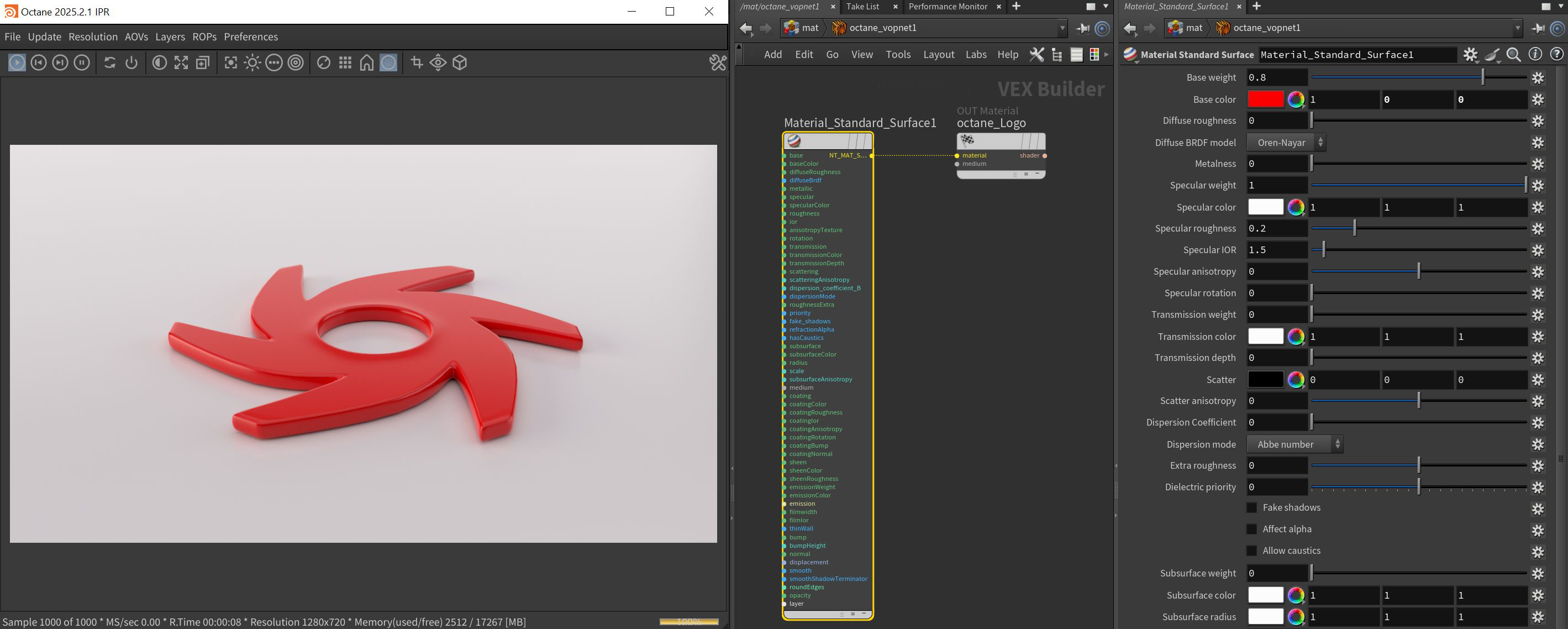
Figure 1: The Standard Surface and it's associated parameters
Standard Surface Parameters
Base Weight - Determines the contribution of the base layer to the shader results.
Base Color - Determines the base color.
Diffuse Roughness - Higher values result in a micro-level of roughness being applied to the base layer.
Diffuse BRDF Model - Provides three models for diffuse light reflectance. Lambertian reflects light equally in all directions and does not support roughness. The Octane option creates a sheen effect much like velvet. And, the Oren-Nayar option behaves more like clay.
Metalness - Determines whether the material behaves in a dielectric (value of 0) fashion or a metallic (value of 1) fashion.
Specular Parameters
Specular Weight - Determines the contribution of the specular layer to the shader results
Specular Color - Determines the specular color, however, leaving this parameter at white produces the most physically accurate result.
Specular Roughness - Higher values will introduce roughness to the specular reflection and transmission channels.
Specular IOR - The index of refraction controlling the Fresnel effect of the specular reflection and transmisson, if activated.
Specular Anisotropy - Controls the shape/direction of the specular and transmission characteristics, -1 is horizontal and 1 is vertical.
Specular Rotation - Controls the orientation of the anisotropic specular reflection.
Transmission Parameters
Transmission Weight - Controls the amount of light scattering through the surface.
Transmission Color - Determines the color accumulated as light rays travel deeper inside the surface. For instance, red glass becomes a deeper red where light rays travel through thicker parts of the surface.
Transmission Depth - Determines the depth rays have to travel inside the surface for the transmission color to be realized.
Scatter - Determines the scattering of the transmission color inside the surface, not to be confused with subsurface scattering which affects the propagation and decay of light in different directions under the surface.
Scatter Anisotropy - Controls the directional bias of the scattering effect. A value of 0 scatters evenly in all directions.
Dispersion Coefficient - Increasing the Dispersion value increases the amount of coloration and dispersion in the Object’s transmission and in caustics.
Dispersion Mode - Determines how the IOR and dispersion inputs are interpreted.
Extra Roughness - Adds additional roughness in the refractive areas of the surface volume.
Dielectric Priority - When nested dielectric surfaces overlap, only surfaces with the highest priority contribute.
Fake Shadows - If enabled, light will be traced directly through the material during the shadow calculation, ignoring refraction.
Affect Alpha - If enabled, refractions will be added to the alpha channel data.
Allow Caustics - If enabled, the photon tracing kernel will create caustics for light reflecting or transmitting through the object.
Subsurface Parameters
Subsurface Weight - Blends between the diffuse and subsurface scattering. When set to 1, there is only subsurface scattering. When set to 0, there is only diffuse characteristics.
Subsurface Color - Determines the color that is scattered under the surface of the object.
Subsurface Radius - Determines the distance light can scatter below the surface before scattering back out.
Subsurface Scale - Controls the distance the light travels under the surface. It scales the subsurface radius data and multiplies against the subsurface color.
Subsurface Anisotropy - Controls the direction of the subsurface characteristics, a value of 0 scatters evenly in all directions.
Medium Parameters
Medium Pin - There are three primary types of mediums used with materials: Absorption, Random Walk, and Scattering. Details can be found in the Mediums and Volumes section.
Coating Layer Parameters
Coating Weight - Controls the amount of coat that is added on top of the base layer and other material characteristics. The coating is reflective and considered to be dielectric.
Coating Color - Determines the color of the coating on top of all colors and characteristics from layers below the coating layer.
Coating Roughness - Controls the glossiness of the coating's specular reflections.
Coating IOR - The index of refraction that defines the Fresnel reflectivity of the coating layer.
Coating Anisotropy - Controls the shape/direction of the coating's specular characteristics.
Coating Rotation - Controls the orientation of the coating's anisotropy effect.
Coating Bump Pin - Allows for a bump texture to be applied to the coating layer.
Coating Normal Pin - Allows for a normal map to be applied to the coating layer.
Sheen Layer Parameters
Sheen Weight - Controls the amount of sheen that is added on top of the base layer and other material characteristics. This characteristic is mainly used to simulate surfaces such as velvet or satin.
Sheen Color - Determines the color of the sheen on top of all colors and characteristics from layers below the sheen layer.
Sheen Roughness - Controls the glossiness of the sheen's specular reflections.
Emission Layer Parameters
Emission Weight - Controls the amount of emitted light.
Emission Color - Determines the color of the emitted light.
Emission Pin - Allows for either the Blackbody or Texture Emission nodes to be connected to the material.
Thin Film Layer Parameters
Film Thickness - The film coating's thickness, mainly used to simulate to look of a thin layer of additional surface material.
Film IOR - The film coating's IOR.
Geometry Properties
Thin Wall - When enabled, this parameter provides the effect that the surface is translucent. This option should only be used with objects that are single sided.
Bump Pin - Used to simulate surface relief using a greyscale texture map.
Bump Height - Determines the height represented by a normalized value of 1.0 in the bump texture. A vaule of 0 disables the bump map and a negative value will invert the bump map.
Normal Pin - Used to distort the normals of the surface using a normal map generated in texturing applications.
Displacement Pin - Used to distort the actual surface of the object using a greyscale image.
Smooth - If enabled, the mesh's triangles will be smoothed. If disabled, the mesh's surface will appear facetted.
Smooth Shadow Terminator - If enabled, the self-intersecting shadow terminator for low polygon objects is smoothed according to the polygon's curvature.
Round Edges Pin - This creates a shader effect at render time that rounds the sharp edges of objects without modifying and reloading the geometry. Higher values will round the edges more. This is useful to bevel hard edges during render time, like when using low-polygon models. See the Round Edges section for more information.
Opacity - Controls the transparencey of the surface.
Layer Pin - Adds a Material Layer above the base material. See the Material Layers section in this manual for more details.
Compatibility Version The Octane version that the behavior of this node should match.