Volume Ramp
The Volume Ramp offers precise control of a volume geometry's color (flame, smoke, etc.). You can use it in conjunction with the Volume Medium discussed in the previous article. Figure 1 shows the ramp parameters. How to use the Volume Ramp is covered in more detail in the Effects Overview section.
|
|
Volume Ramp
|
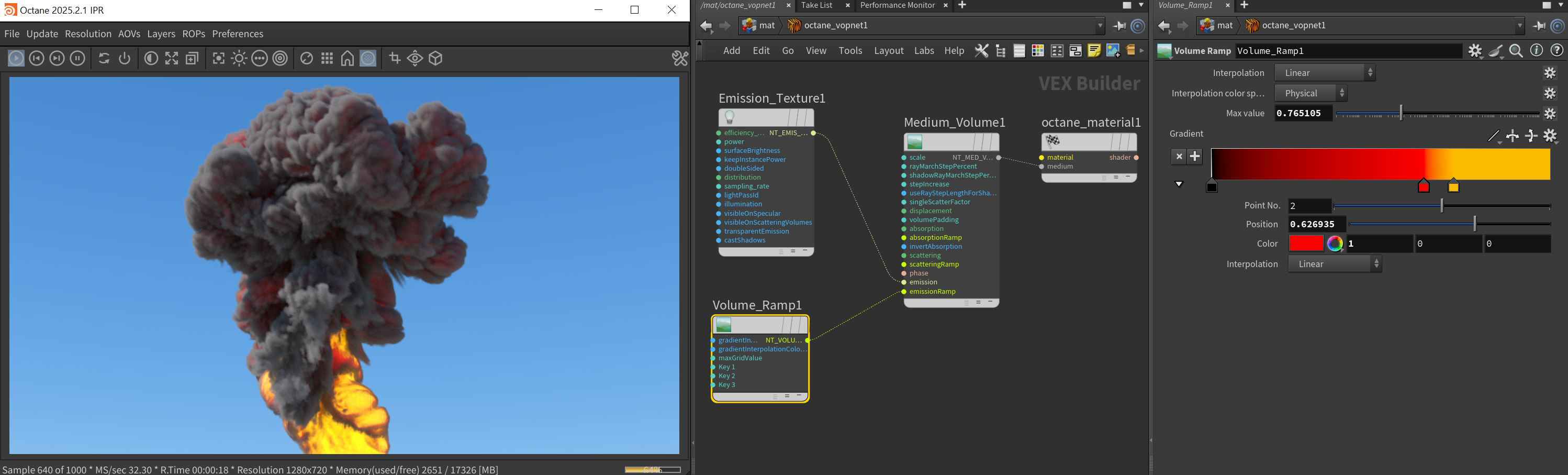
Figure 1: The Ramp volume node parameters
Volume Ramp Parameters
Interpolation - Determines the method for blending the gradient colors.
Interpolation Color Space - The color space in which colors are combined between control points. The Physical option should be used for textures that contain non-color data, like normals.
- Physical - Uses scene-linear values and creates gradients that approximate optical effects in the real world.
- Perceptual - Uses the Oklab color space and creates gradients that vary smoothly to the human eye.
Max Value - Determines the max grid value which changes how the gradient colors propagate through the volume.
Gradient - Determines the colors to be blended through the volume.