Network Rendering
Network rendering allows additional GPUs in other computers to be utilized in rendering images. OctaneRender® distributes compiled render data and not scene data, so no file management is required by the user. Conceptually it is similar to working with additional GPUs by allowing the distributed rendering of single images over multiple computers connected through a fast local area network. Network rendering requires a Primary node and one or more Render Nodes on different computers. There is a detailed description of Network Rendering in Otoy's document site.
Network rendering requires OctaneRender Enterprise and a properly configured network, consisting of a Primary Node and Render Node machines (with installed GPU devices). This section will discuss a simple approach for network rendering using the tools directly within Octane.
Primary Render Node, Render Nodes, And Daemons
The Standalone version acts as the Primary Node and a special console version of OctaneRender, octane_node.exe, can run on other computers as Render Nodes. They should all be on different computers, or they would have to share the same GPUs.
The OctaneRender Primary Node does all the render data processing. The Render Node does not need to have a powerful CPU, but the Render Node needs enough RAM to store the render data plus some render results. The Render Node's operating systems can also be different since the communication between the machines is cross-platform. No data is stored on the Render Node’s discs, it's all stored in memory.
Each time network rendering is required, the Render Node process has to launch on the Render Node machines. The Render Node daemon makes the control of the Render Nodes more practical, as it can launch at startup on each machine in the network. The daemon is the little program that starts a Render Node process on the machine on request by a Primary Node, monitors it, and stops it on request by a Primary Node. Monitoring means making sure that a running Render Node sends a regular heartbeat to the daemon, and if that doesn’t happen, it first tries to stop the Render Node, and then it kills the process as a last resort if necessary. The daemon runs all the time, and starts/stops a Render Node process if a Primary Node requests it. The daemon also listens for the heartbeat of the Render Node to check if the Render Node process is still running. This Render Node daemon eliminates needing to launch the Render Node process manually on each computer each time rendering is required on the Render Node.
|
|
Network Rendering
|

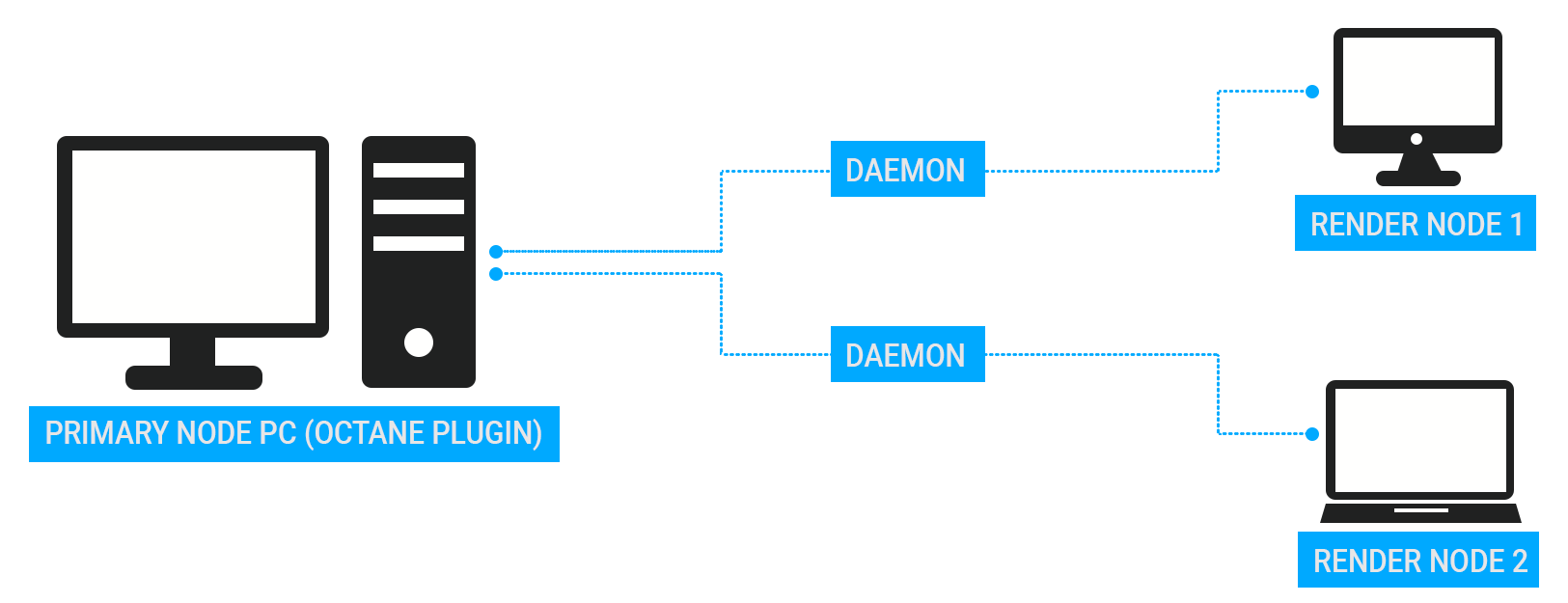
Figure 1: A diagram of the Primary Render Node, Render Node, and Daemon processes