Composite Texture
The Composite Texture node is used in conjunction with the Texture Layer nodes to combine textures in complex ways for various effects. In figure 1, a Checks and Color Squares node are blended together using the Blend Texture and Composite Texture nodes. An Adjust Hue node is connected to the Layer 2 pin on the Composite Texture node to adjust the hue of the Color Squares node.
|
|
Composite Texture
|

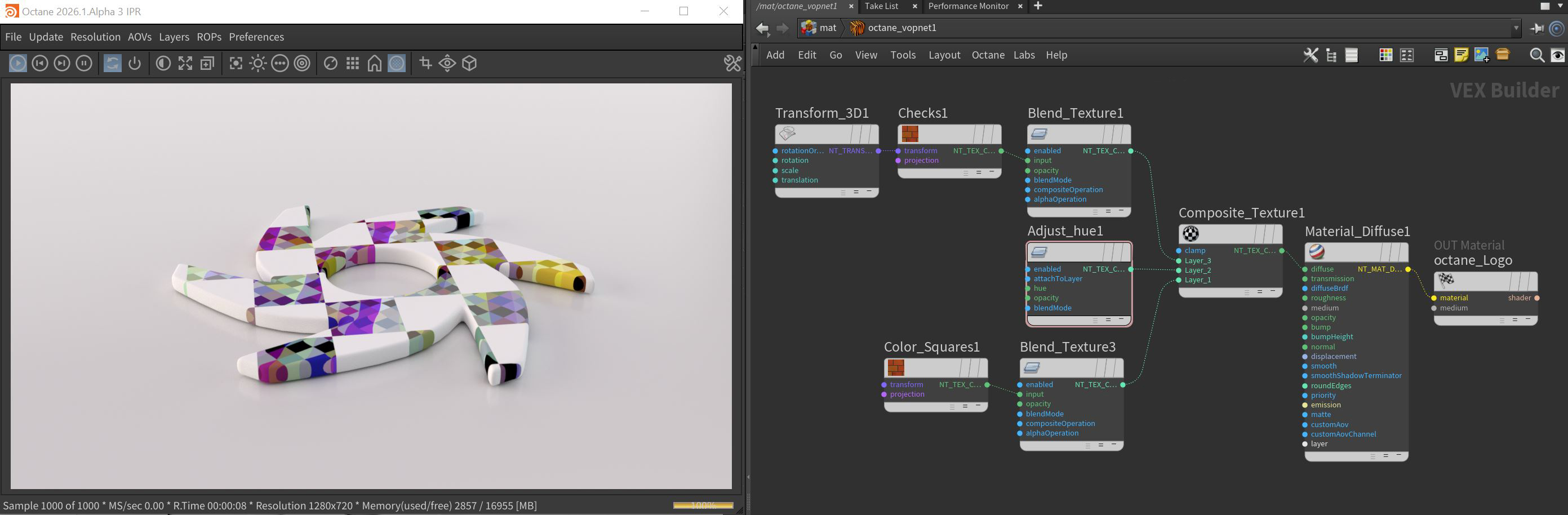
Figure 1: A Texture Layer node structure example
The Composite Texture node can accept Blend Texture nodes on its Layer input pins. The connected textures through the use of the Blend Texture node, are layered from bottom up (1,2,3,etc.). The Opacity and Blend Mode on the Blend Texture node are used to reveal or blend the multiple texture layers together.
Composite Texture Parameters
Clamp - Clamps the results of blending each layer to (0,1), This parameter is ignored when used as a normal map.
Layer Count - Adds additional layer pins to the node.
Compatibility Version - The Octane version that the behavior of this node should match.