Map range
The Map Range node remaps an input value by interpolating it to a newly defined output range.
|
|
Map Range
|
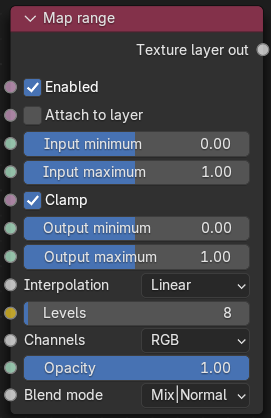
Figure 1: Map range Node
Map Range Parameters
Enabled - Whether this layer is applied or skipped.
Attach to layer - When selected, this layer modifies the input of the next lower layer that is not itself attached to a layer. Otherwise, it applies to the output of the next lower layer.
Input minimum - The start value of the input range.
Input maximum - The end value of the input range.
Clamp - If enabled, the values are clamped to the minimum and maximum range. Otherwise values outside the range will be unmodified.
Output minimum - The start value of the output range.
Output maximum - The end value of the output range.
Interpolation - Mode used for translation.
Levels - Number of distinct output levels. Only active when using the Steps or Posterize interpolation methods.
Channels - The channels to which to apply the operation (others are left unmodified).
Opacity - The opacity channel used to control the transparency of this layer.
Blend mode - The blend mode used to mix the RGB values of this layer with those of the background.