Iridescent
The Iridescent texture node produces an effect where surfaces appear to gradually change color as the angle and illumination of view changes (figure 2).
|
|
Iridescent
|

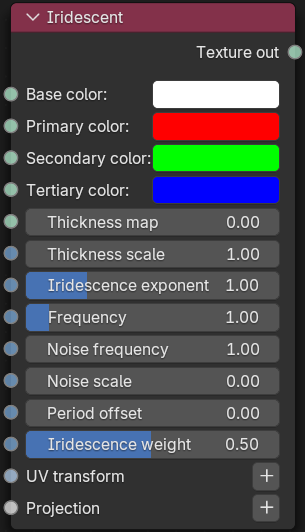
Figure 1: Iridescent Node
|
|
Iridescent
|

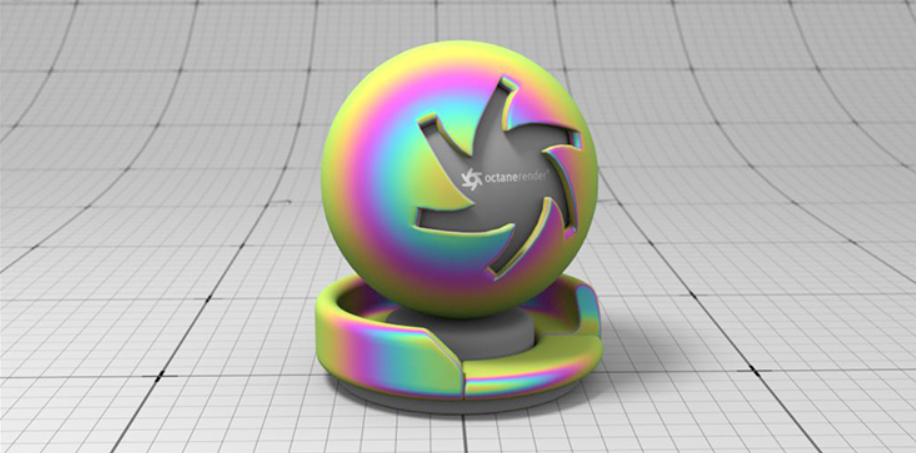
Figure 2: The Iridescent node example
Iridescent Parameters
Base Color - Determines the base color underlying the other iridescent colors.
Primary Color - The first color layer above the base color.
Secondary Color - Provides an additional color layer to mix with the base and primary colors.
Tertiary Color - Provides an additional color layer to mix with the secondary, primary, and base colors.
Thickness Map - Determines the thickness of the color bands.
Thickness Scale - A scale value applied to the thickness map.
Iridescent Exponent - Adjusts the overall shape of the iridescent effect.
Frequency - Determines how many color bands are generated.
Noise Frequency - Adjusts the smoothness of the color bands.
Noise Scale - Determines the scale of the noise parameter.
Period Offset - Adjusts the positioning of the color bands across the surface.
Iridescence Weight - Blend the primary, secondary, and tertiary color bands with the base color.
UVW Transform - Positions, scales, and rotates the surface texture.
Projection - Sets how the texture projects onto the surface.