Curvature texture
The Curvature Texture node can be used to alter the look of the edges of a surface. In figure 2, the Curvature Texture node is used to mix red and blue textures on a Glossy material.
|
|
Curvature Texture
|
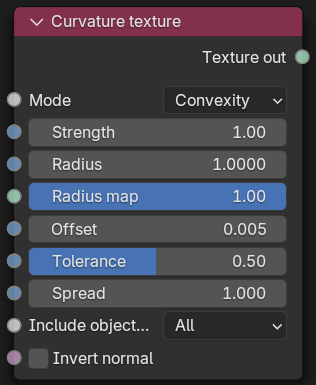
Figure 1: Curvature texture Node
|
|
Curvature Texture
|
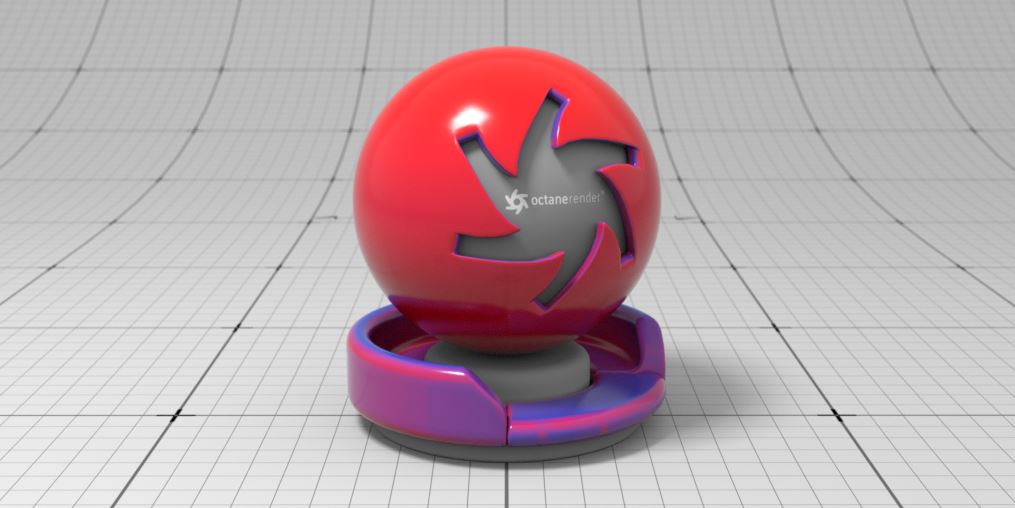
Figure 2: A Curvature Texture node example
Curvature Texture Parameters
Mode - Determines the type of curvature to sample.
Strength - Determines the overall strength of the curvature effect.
Radius - Specifies the maximum area affects by the curvature effect.
Radius Map- Determines the proportion of the maximum area affected by the curvature effect.
Offset - Specifies the offset from the surface used to sample the neighboring geometry.
Tolerance - Determines the tolerance for small curvature and small angles between polygons
Spread - Controls the ray direction with respect to the normal of the surface where 0 means the curvature is sampled straight in the direction of the surface normal, and 1 means the sampling rays are shot perpendicular to the surface normal.
Include Object Mode - Determines which objects should be included in calculating the curvature value.
Invert Normal - Inverts the normal direction when calculating the curvature value.