OSL Camera
The OSL Camera node is a scriptable camera node. It can create custom camera types for any purpose (such as VR warping, custom lens distortion, etc.) with OSL (Open Shader Language) scripts. It is a flexible camera that can be used to match the rendering to the existing footage, as one example. By default, one OSL Camera is one OSL compilation unit, which contains only one shader, so it has one output attribute pin that connects to the Camera input pin of a Render Target node. OSL is a standard created by Sony Imageworks. To learn about the generic OSL standard, information is provided from the OSL Readme.
In figure 1, a custom OSL script was written to generate an OSL Camera that features radial barrel lens distortion parameters.
|
|
Custom OSL Camera
|
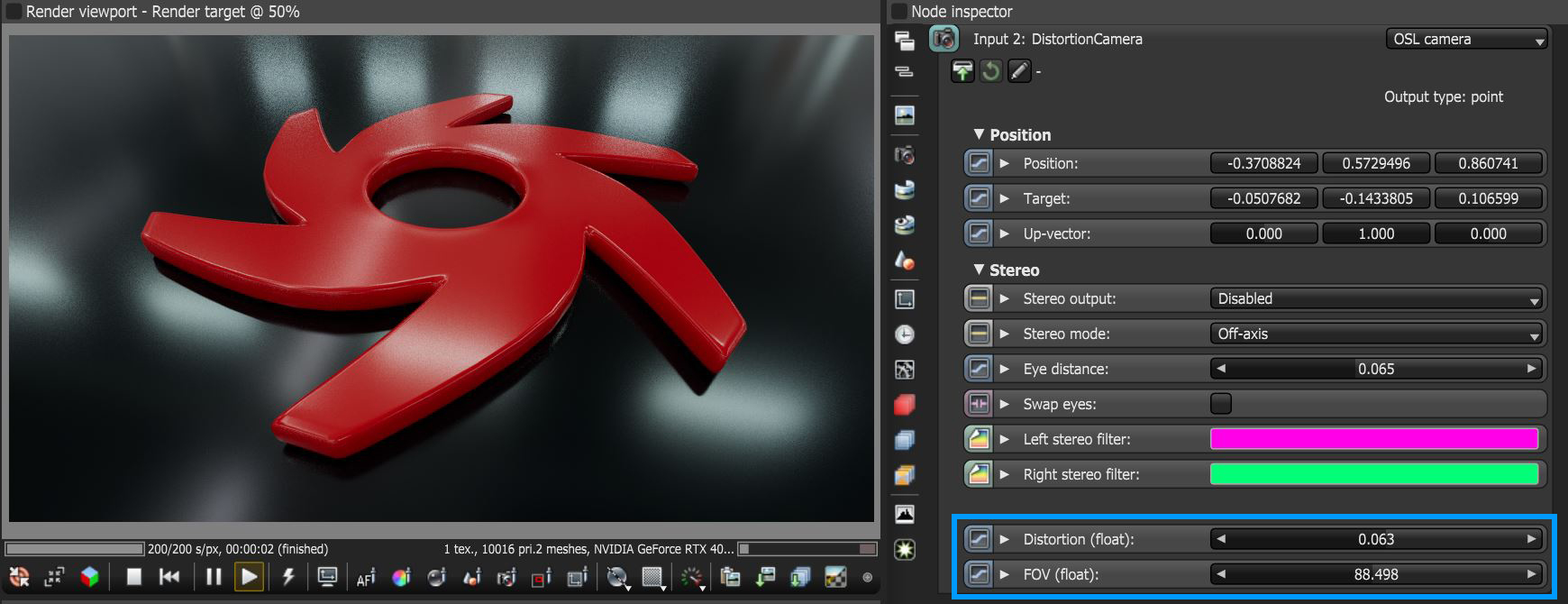
Figure 1: An OSL Camera node with custom lens distortion parameters
The default parameters of an OSL Camera node includes its position, target, up-vector (orientation) and stereo-related parameters (figure 2).
|
|
OSL Camera Parameters
|
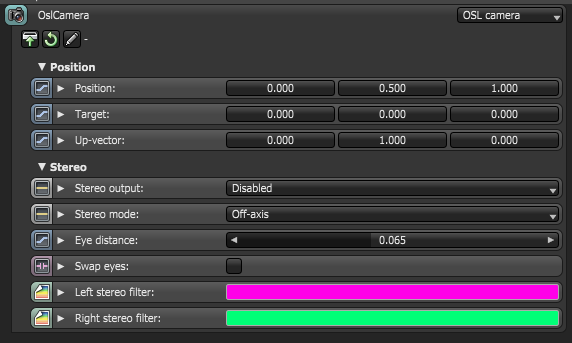
Figure 2: The default parameters of the OSL Camera node
The customized OSL script is written into the OSL Camera node to create custom camera types. To edit the script, click on the Pencil icon to go to the script editor window. If the script exists as an external OSL file, insert the OSL file into the node through the Load icon. Any existing file already used within an OSL Camera node can be edited. To refresh the file and use the edits, click the Reload icon (figure 3) .
|
|
OSL Script Icons
|
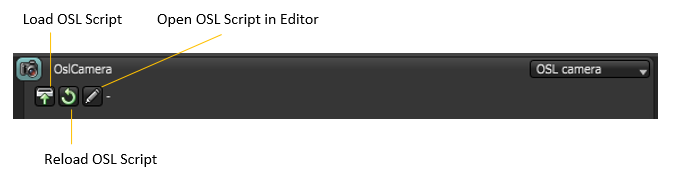
Figure 3: OSL script icons
To compile an OSL script in the Script Editor window, click on the Compile this OSL Shader button (figure 4).
|
|
Script Editor Window
|
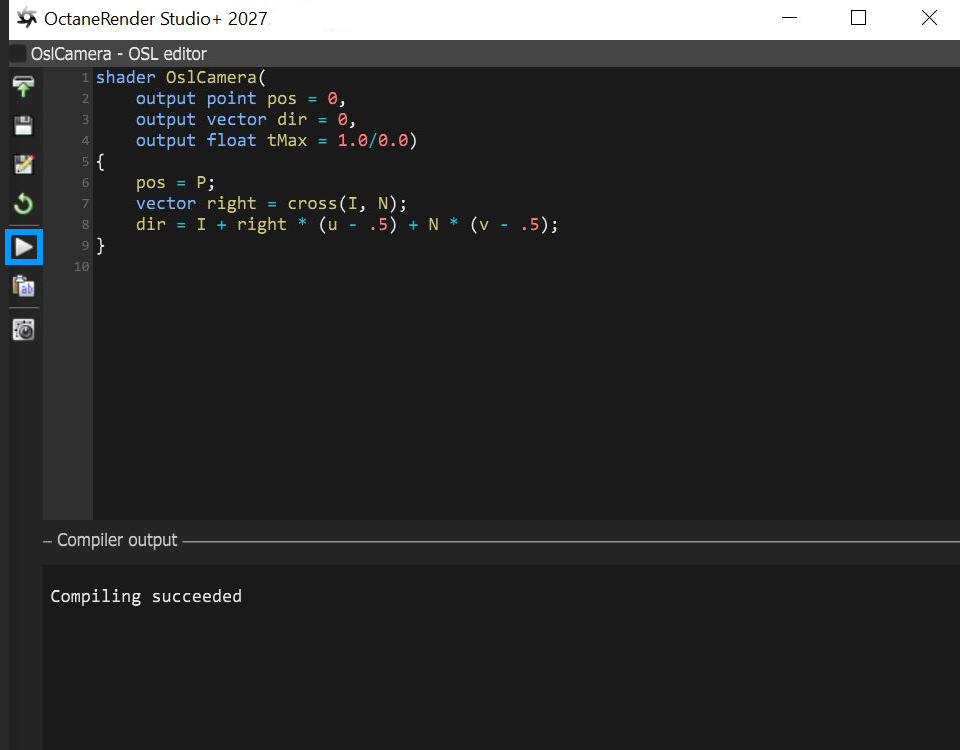
Figure 4: The script editor window showing the initial script of the OSL Camera node
When the OSL Camera node is accessed for the first time, the node is provided with an initial OSL script shown in figure 4, above.:
Shader OslCamera (
output point pos = 0,
output vector dir = 0,
output float tMax = 1.0/0.0)
{
pos = P;
vector right = cross (I, N);
dir = I + right*(u-.5) + N*(v-.5);
}
The initial script’s declaration component includes the three required outputs presented as variables with output types point, vector, and float, respectively. Each OSL I/O type corresponds to an OctaneRender attribute:
- point corresponds to a Projection attribute node (Box, Mesh, UV, Spherical, Cylindrical, etc.).
- vector“ corresponds to a Float attribute node (X, Y, Z).
- float“ corresponds to a Float attribute node (1D-value).
For a list of OSL variable declaration input/output types in the OSL Specification that OctaneRender supports, refer to the Appendix topic in this manual on OSL Implementation in OctaneRender.
The three required output variables in the initial script’s declaration represents a camera ray’s position, direction, and maximal depth. The initial script’s function body then initializes the position and orientation of the OSL Camera shader using OSL global variables P, I, and N, which defines any standard camera’s eye, direction, and up vectors, respectively. To further control the position and orientation of the camera shader, there are two options:
- Customize the script using OSL language global variables P, I, and N.
- Transform a point or a vector from camera space to world space.
Any camera type can be created by customizing the script. Depending on the custom script, the resulting OSL shader may have more input type variables that appear as additional input pins on the OSL Camera node that represents it.
The OSL Camera Output Variables
The camera shader has three outputs representing a ray (note that the names are arbitrary):
point pos = Ray position:
This is often set to P, but it may be set to other points to implement depth of field, or a near clipping plane.
vector dir = Ray direction:
The render engine will take care of normalizing this vector if needed.
float tMax = Maximum ray tracing depth:
Measured along the direction of dir. May be used to implement a far clipping plane.
Set to 1.0/0.0 (infinity) to disable far clipping.
If tMax is 0, or if dir has 0 length, the returned ray is considered invalid, and the renderer will not perform any path tracing for this sample.
Accessing The OSL Camera Position
Like other camera types, OSL Camera nodes have static input pins that define the camera's position and orientation. It is not mandatory for the camera shader to use this position, but if it does, the camera supports motion blur and stereo rendering.
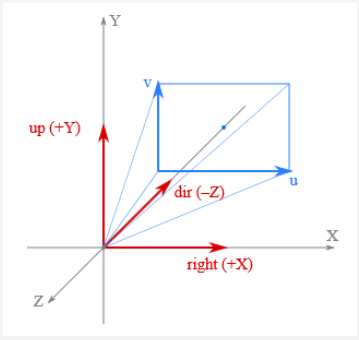
Figure 7: Camera position coordinates
Within camera shaders, the camera's position and orientation is available by the standard global variables defined by OSL:
point P: Camera position
vector I: Camera direction (sometimes called *forward*)
normal N: vector, perpendicular to I
float u, float v: Coordinates on the film plane, mapped to the unit square. (0, 0) is at the bottom-left corner. These coordinates can be fetched via getattribute("hit:uv", uv) and via the UV projection node.
Alternatively, the camera position is also available via the camera coordinate space. This is an orthonormal coordinate space. Without transform the camera is looking along the -Z axis with the +Y axis as up-vector, i.e. the axes are defined as:
+X: Right vector
+Y: Up vector
–Z: Camera direction
As a starting point, below is a basic OSL implementation of a Thin Lens camera:
shader OslCamera(
float FocalLength = 1 [[ float min = 0.1, float max = 1000, float sliderexponent = 4]],
output point pos = 0,
output vector dir = 0,
output float tMax = 1.0/0.0)
{
float pa;
int res[2];
getattribute("camera:pixelaspect", pa);
getattribute("camera:resolution", res);
float u1 = 2 * (u - .5);
float v1 = 2 * (v - .5) * pa * res[1] / res[0];
pos = P;
vector right = cross(I, N);
dir = 2*FocalLength * I + v1 * N + u1 * right;
dir = transform("camera", "world", dir);
}
For a list of OSL variable declaration input/output types in the OSL Specification that OctaneRender supports, refer to the Appendix topic on OSL Implementation in OctaneRender. To learn more about scripting within OctaneRender using the Open Shader Language, refer to The Octane OSL Guide.