Baking Camera
The Baking Camera is used to bake textures and illumination into new texture maps for scene optimization. For more details on texture baking using the Baking Camera please see the Texture Baking topic.
|
|
Baking Camera Parameters
|

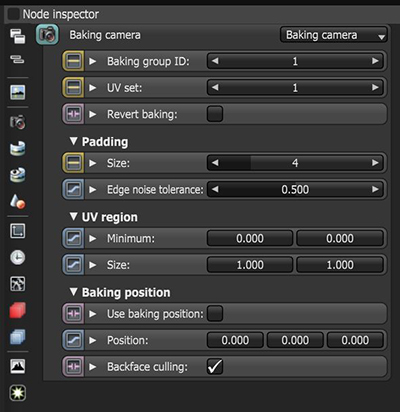
Figure 1: The parameters of the Baking camera in the Node Inspector
Baking Camera Parameters
Baking Group ID - Specifies the group ID to bake. By default, all objects belong to the default baking group number 1.
UV Set - This determines the UV coordinates to use for baking.
Revert Baking - Flips the camera directions.
Padding
Padding Size - The number of pixels added to the UV map edges. The padding size is specified in pixels. The default padding size is set to 4 pixels, with 0 being the minimum and 16 being the maximum size.
Edge Noise Tolerance - Helps remove hot pixels appearing near the UV edges. Values close to 1 do not remove any hot pixels, while values near 0 attempts to remove them all.
UV Region
Minimum - The coordinates in UV space for the origin of the bounding region for baking.
Size - This is the size in UV space of the bounding region for baking.
Baking Position
Use Baking Position - Uses the position for baking position-dependent artifacts.
Position - This is the camera position for position-dependent artifacts such as reflections.
Backface Culling - This determines whether to bake back-facing geometry.