Texture Image UDIM
The UDIM Image node sets up a UV tile grid similar to UDIM image tile formats. Use the <UDIM> tag to configure the UDIM textures. For example: $HIP/testcube_v01_<UDIM>_BaseColor.jpg (Figure 1). These tiles formats are generated in modeling and texturing applications such as ZBrush® and Substance Painter.
|
|
Image UDIMs
|

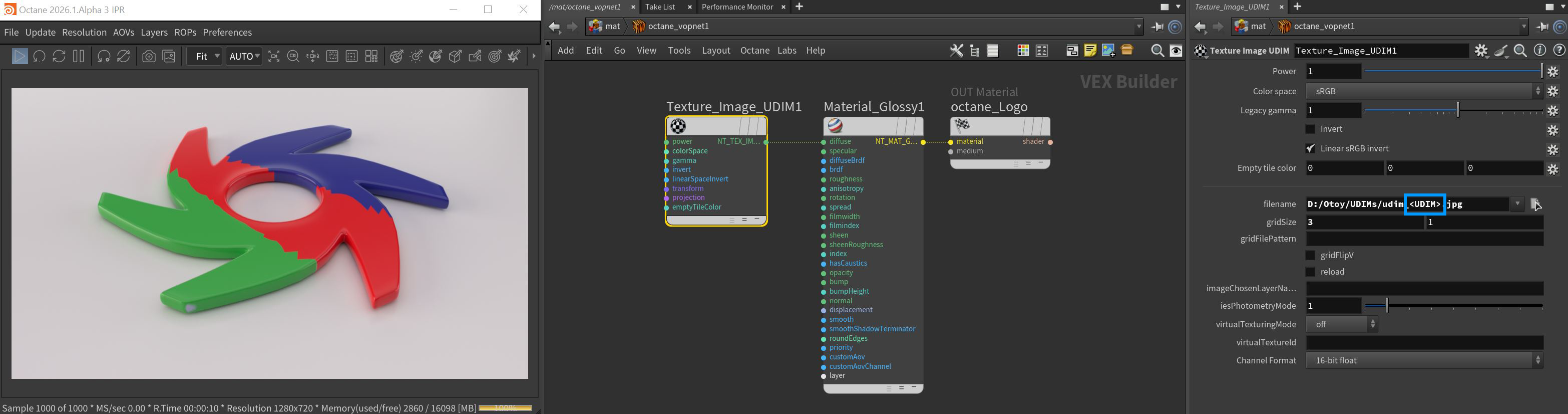
Figure 1: UDIM image parameters with the <UDIM> tag
UDIM Image Parameters
Power - Controls image brightness. Lowering the value makes the image look darker.
Color Space - This menu was added to support the ACES color management system and sets the color space of the image texture: A few but not all notable options are listed below.
- Non-Color Data — Use this option for data maps (such as Normal maps). Any map set to this value will use a gamma value of 1.0.
- sRGB — For any image using the sRGB color space. This option has a non-linear response curve applied, with a gamma of 2.2, per the definition of sRGB. Note that the gamma value is ignored with this setting as a result.
- Linear sRGB + Legacy Gamma — This is the default option, for backwards compatibility with previous versions of Octane. For true linear images, however, make sure that the gamma value is set to 1.0. Use this option if you wish to manually adjust the gamma value of your image.
- ACES2065-1 — The ACES archival color space (widest gamut).
- ACEScg — The ACEScg color space, which is a smaller gamut than ACES2065-1; if you have ACES images coming from outside sources, this may be the best option.
Legacy Gamma - Controls input image luminance, and tunes or color-corrects images if needed, however, this parameter is only used when the Color Space is set to Linear sRGB+Legacy.
Invert - Inverts the image, which is useful for Bump and Opacity maps.
Linear sRGB Invert - Inverts the image after conversion to linear color space.
Empty Tile Color - The color used if no image is loaded for a tile.
Filename - The file path name of the image texture. Use the <UDIM> tag to configure the UDIM textures.
Grid Size - Determines the size of the image tile grid.
Grid File Pattern - The render engine ignores this attribute, but it allows a user interface to reliably offer an interface to select tiles.
Grid Flip V - Flips the tile order in the V direction.
Reload - Forces the texture file to load again.
Image Chosen Layer Name - Indicates the chosen layer name, if the current image has multiple layers.
IES Photometry Mode - Can be used to adjust the normalization of data from an IES file.
Virtual Texturing Mode - Activates virtual texture mode.
Virtual Texture ID - Explicit image ID to identify cached virtual textures, used when an image is set up directly via image attributes. In order to successfully match cached files, ensure that other image load preferences are set to the same values.
Channel Format - Determines the proper format of the UDIM textures.