Scratches
The Scratches texture map produces a pattern that can be used for adding wear and tear to the surface of an object (figure 1).
|
|
Scratches
|

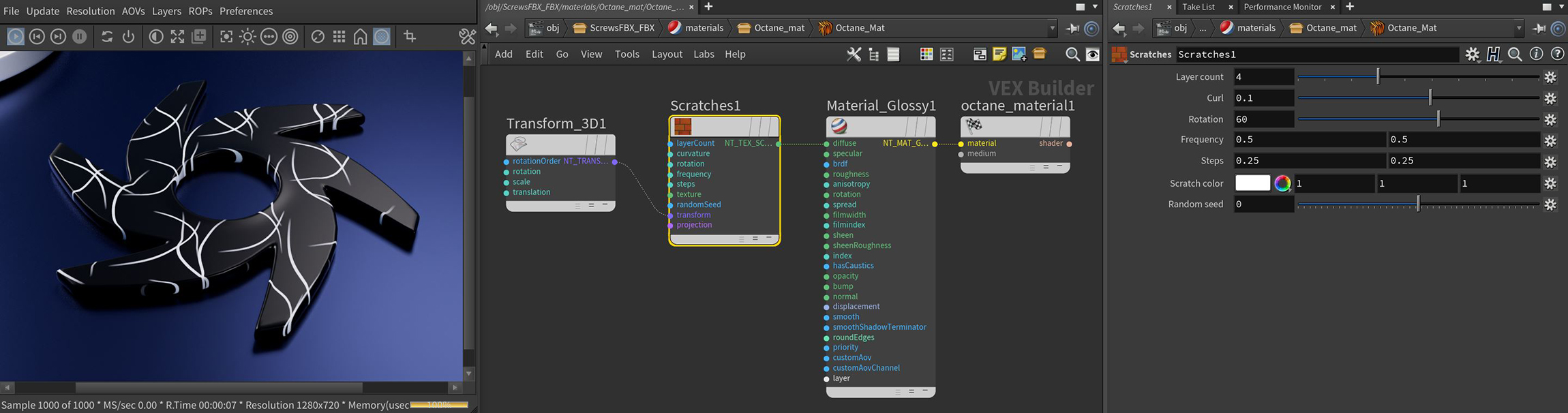
Figure 1: The Scratches node and it's associated parameters
Scratches Parameters
Layer Count - Controls the number of scratch layers.
Curl - Determines the curvature of the scratches.
Rotation - Adjusts the scratch orientation.
Frequency - Controls the horizontal and vertical frequency of the effect.
Steps - Adjusts the stepwise frequency increase from one layer to the next.
Scratch Color - Determines the color of the scratches.
Random Seed - Provides random variations to the pattern of scratches.
Transform Pin - Positions, scales, and rotates the surface texture.
Projection Pin - Sets how the texture projects onto the surface.