Rain Bump
The Rain Bump procedural texture produces a rain drop-like pattern that can be easily animated (figure 1).
|
|
Rain Bump
|

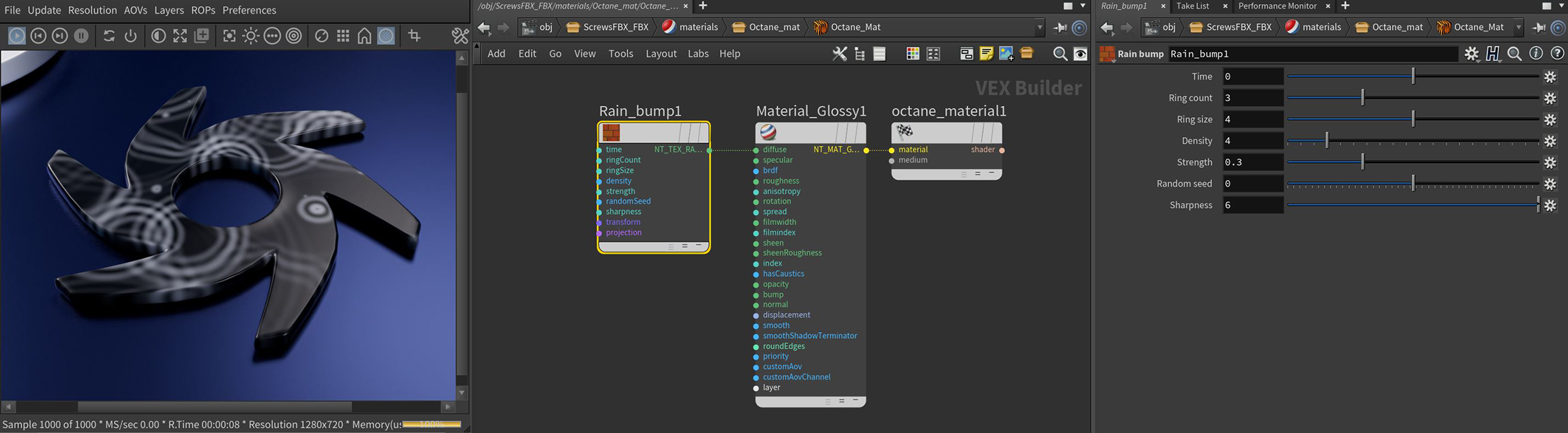
Figure 1: The Rain Bump texture applied to a Glossy material on the Octane logo
Rain Bump Parameters
Time - Provides control over animating the texture effect using LUA scripts.
Ring Count - Determines how many rings each rain drop will produce.
Ring Size - Specifies the size of each rain drop.
Density - Controls how many rain drop will be generated.
Strength - Acts as an opacity parameter for the visibility of of the rain drops, higher values produce brighter effects which will produce a stronger bump effect.
Random Seed - Changes the pattern of the rain drops.
Sharpness - Blurs or sharpens the effect of each rain drop ring.
Transform Pin - Positions, scales, and rotates the surface texture.
Projection Pin- Sets how the texture projects onto the surface.