FBM Flow Noise
The FBM Flow Noise procedural texture produces a 3D noise pattern comprised of four color parameters (figure 1).
|
|
FBM Flow Noise
|

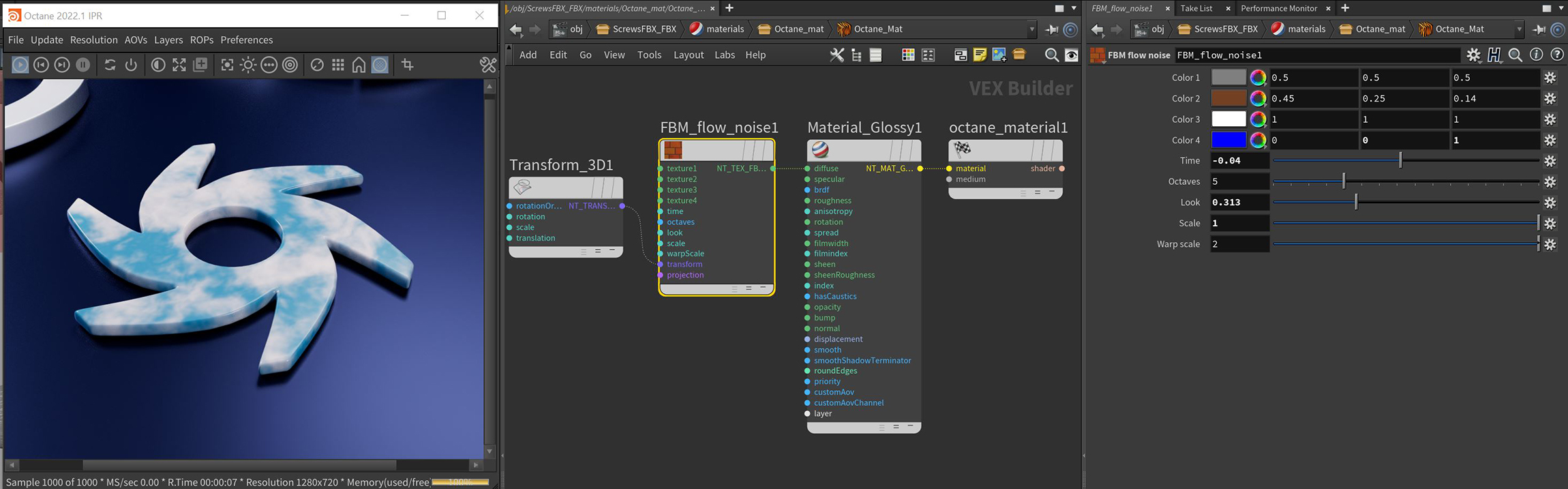
Figure 1: The FBM Flow Noise node and it's associated parameters
FBM Flow Noise Parameters
Color 1, 2, 3, 4 - Specifies the four colors used for the flow noise.
Time - Animates the FBM Flow Noise effect.
Octaves - Changes the number of octaves over which the noise function is calculated, otherwise known as frequencies.
Look - Alters the flow noise pattern with a wave-like effect.
Scale - Scales the smaller facets of the flow noise.
Warp Scale - Scale the flow noise as a larger effect than the Scale parameter.
Transform Pin - Positions, scales, and rotates the surface texture.
Projection Pin - Sets how the texture projects onto the surface.