Environment - Daylight
OctaneRender® has a powerful Daylight environment system to simulate real-world illumination that consists of a primary light (sun), indirect light (sky/environment), and atmosphere (figure 1). This is lighting system can be activated in a Render Target node.
|
|
Environment Daylight
|

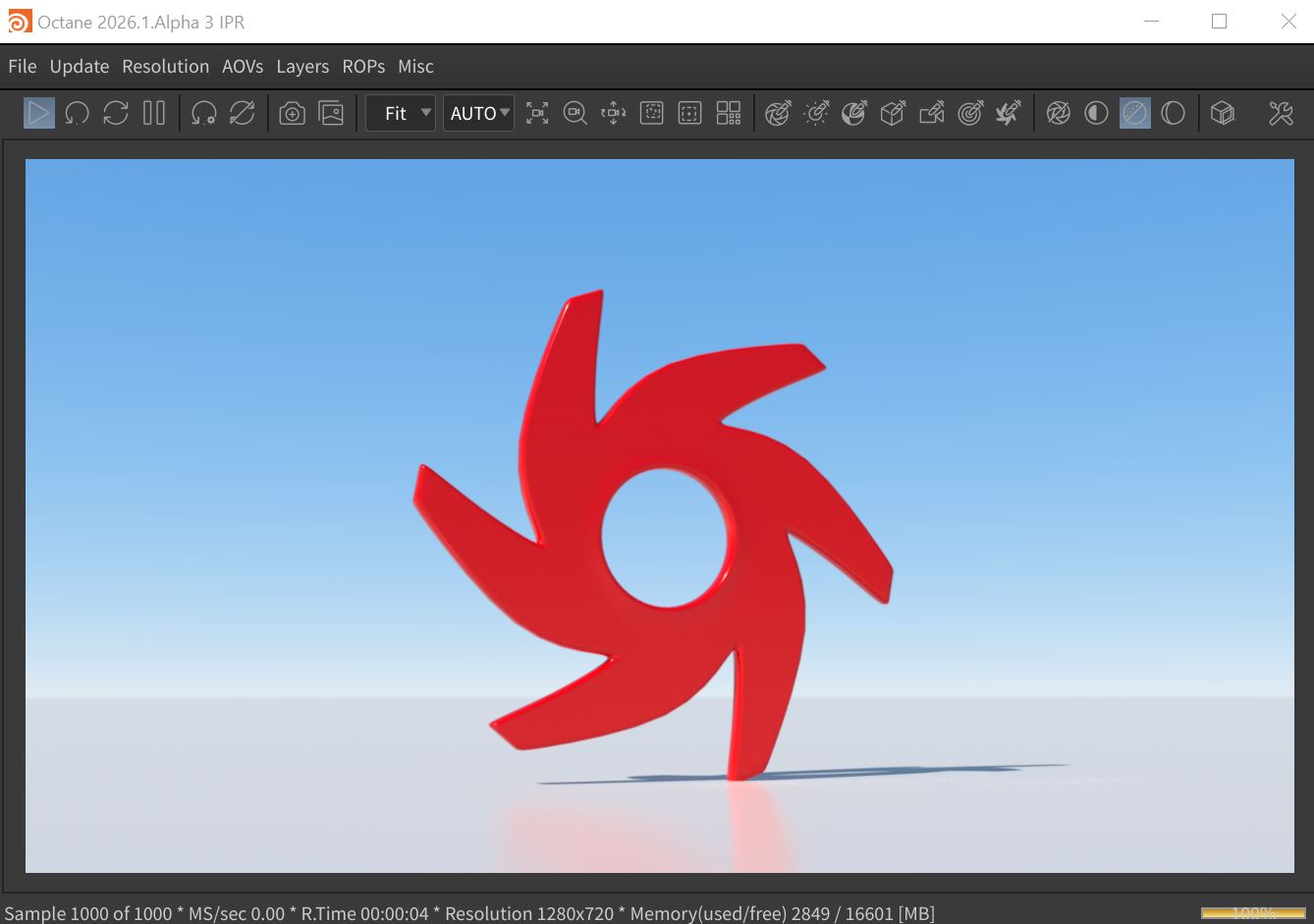
Figure 1: The Daylight Environment rendering using the default settings
The Daylight system is found in the Environment tab of the Render Target parameters window (Figure 2). The Daylight system can also be found in the Octane Render Setup node located in the Object window (figure 3).
|
|
Environment Daylight
|

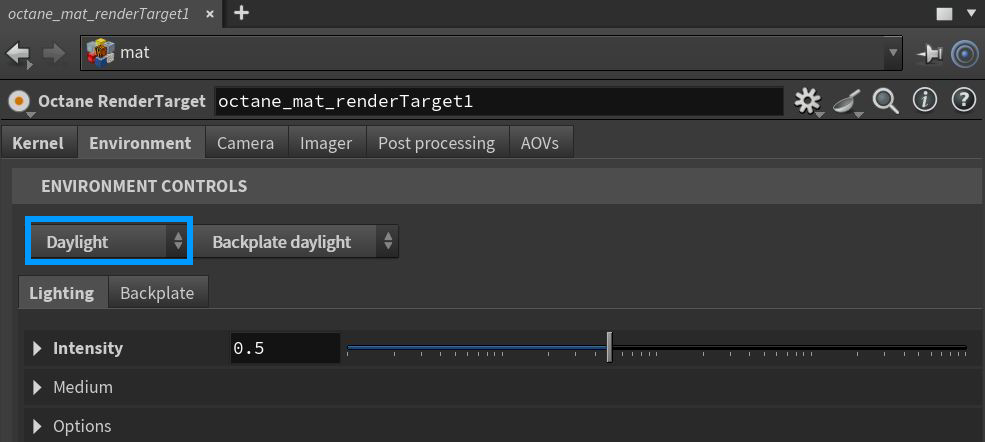
Figure 2: Accessing the Daylight parameters node from an Octane Render Target node
|
|
Environment Daylight
|

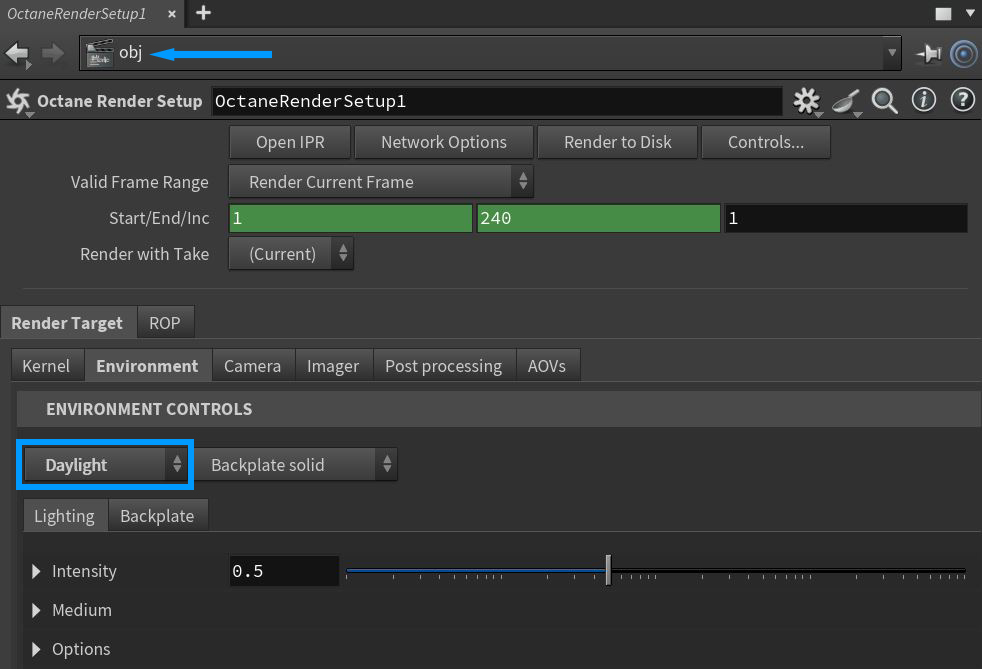
Figure 3: Accessing the Daylight parameters in the Octane Render Setup node
Parameters specific to the Daylight system are found in the Intensity, Medium, and Options rollouts.There is a Backplate tab available to further control the options for displaying backplate elements (figure 4). If the Backplate is set to anything other than Disabled, the Backplate parameters will override any duplicate background elements available in the Daylight tab. Note that the Backplate parameters do not affect the physical lighting on scene objects.
|
|
Environment Backplate
|

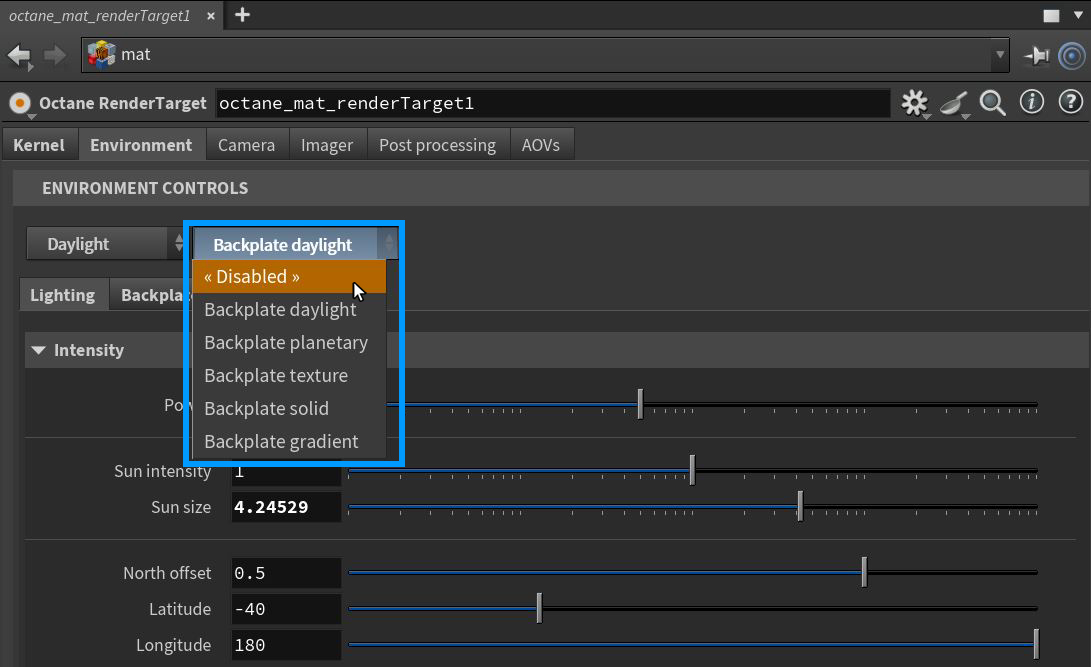
Figure 4: Accessing the Environment Backplate parameters
Daylight Environment Lighting Tab Parameters
Intensity Rollout
Power - Adjusts the light strength. This affects the image's overall contrast and exposure level.
Sun Intensity - The scale factor that is applied to the sun only. Use this to adjust the relative power of the sun compared to the sky.
Sun Size - Controls the sun radius in the Daylight environment.
North Offset - Adjusts the scene's North direction. This is useful for architecture visualization to ensure the sun's direction in the scene is accurate.
Longitude/Latitude - Make realistic sun settings for a specified geographic location.
Set Date and Time - With this parameter active, the following parameters become available:
- Month/Day/GMT Offset/Hour - Place the sun in the sky according to the date/time for the sun at the current longitude/latitude.
Daylight Model - Specifies the daylight model to use as the current environment.
- Octane Daylight - This is the new default daylight model simulates full-spectrum daylight, providing more sky color variation as the sun moves along and bearing shorter rays as the sun moves closer to the normal plane.
- Preetham Daylight - This is the old daylight model that lights a scene with basic spectral radiance as the sun moves over the horizon at a relative distance from the object.
- Nishita Daylight - Implements atmospheric scattering based on the Nishita sky model and displays the color variations, which are optical effects caused by the particles in the atmosphere.
- Hosek Wilkie Daylight - Produces more realistic and detailed results than other implementations specially in hazy conditions and near the horizon.
Sky Turbidity - The Turbidity can adjust the sharpness of the sun light's shadows. A low value creates sharp shadows like a sunny day, and a higher value diffuses the shadows like a cloudy day.
Sky Color/Sunset Color - These settings are used by the daylight model to customize the spectral shade of light. This can affect the scene's overall mood.
Ground Color - Base color of the ground which is an infinite plane that is only visible in the final rendering. It serves to produce a horizon line for the Daylight system. This allows the user to control the color of the infinite ground plane associated with the Sun Sky systems.
Ground Start Angle - The angle (in degrees) below the horizon where the transition to the ground color starts.
Ground Blend Angle - The angle over which the sky color transitions to the ground color.
Enable Daylight Texture - Provides an option to use an imported texture as the sky.
Medium Rollout
Offers control of a medium used to give aerial density and fog to the Daylight system. This is an actual volume medium effect, not a cheat. It interacts directly with any lighting in the scene.
Options Rollout
Importance Sampling - This toggles the Sky texture's importance sampling, similar to the Texture environment's importance sampling.
Cast Photons - If photon mapping is used, this option casts photons from the bright areas of the scene.
Use in Post Volume - Enables or disables the environment in post volume rendering.
Backplate Daylight Tab Parameters
These parameters will override their conterparts in the Lighting tab.
|
NOTE The Backplate parameters do not affect the physical lighting on scene objects. |
Intensity Rollout
Power - Adjusts the light strength on the background elements. This affects the image's overall contrast and exposure level.
Sun Intensity - The scale factor that is applied to the sun only. Use this to adjust the relative power of the sun compared to the sky.
Sun Size - Controls the sun radius in the Daylight environment.
Sun Direction - Set the direction/angle of the sun in the sky.
North Offset - Adjusts the scene's North direction. This is useful for architecture visualization to ensure the sun's direction in the scene is accurate.
Daylight Model - Specifies the daylight model to use as the current environment.
- Octane Daylight - This is the new default daylight model simulates full-spectrum daylight, providing more sky color variation as the sun moves along and bearing shorter rays as the sun moves closer to the normal plane.
- Preetham Daylight - This is the old daylight model that lights a scene with basic spectral radiance as the sun moves over the horizon at a relative distance from the object.
- Nishita Daylight - Implements atmospheric scattering based on the Nishita sky model and displays the color variations, which are optical effects caused by the particles in the atmosphere.
- Hosek Wilkie Daylight - Produces more realistic and detailed results than other implementations specially in hazy conditions and near the horizon.
Sky Turbidity - The Turbidity can adjust the sharpness of the sun light's shadows. A low value creates sharp shadows like a sunny day, and a higher value diffuses the shadows like a cloudy day.
Sky Color/Sunset Color - These settings are used by the daylight model to customize the spectral shade of light. This can affect the scene's overall mood.
Ground Color - Base color of the ground which is an infinite plane that is only visible in the final rendering. It serves to produce a horizon line for the Daylight system. This allows the user to control the color of the infinite ground plane associated with the Sun Sky systems.
Ground Start Angle - The angle (in degrees) below the horizon where the transition to the ground color starts.
Ground Blend Angle - The angle over which the sky color transitions to the ground color.
Options Rollout
Backplate - Makes the Background Plate environment visible in the background.
Reflections - Makes the Background Plate environment visible in reflections..
Refractions - Makes the Background Plate environment visible in refractions.