Displacement
Texture Displacement mapping utilizes a 2D texture map in order to generate 3D surface relief (Figure 1). As opposed to Bump and Normal mapping, Displacement mapping is generated at render time and it displaces the actual geometric position of points over the textured surface. The standard displacement node in Houdini accepts imported texture maps and baked procedural textures. Additionally, the object is required to have UV coordinates, either with a typical projection type or unwrapped.
|
|
Texture Displacement
|

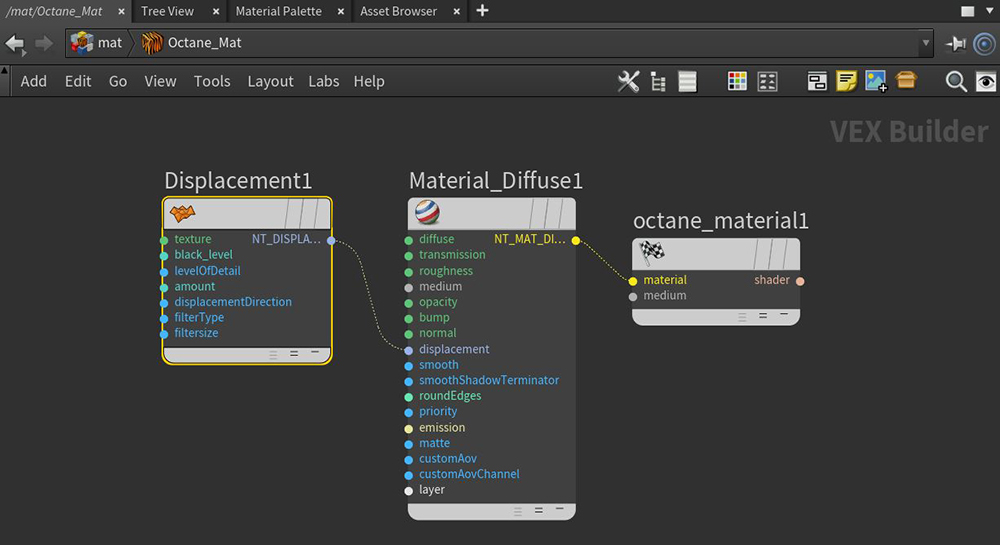
Figure 1: Adding a Displacement node to a shading network
Displacement Parameters
Texture Pin - Accepts Displacement maps generated in content creation software such as ZBrush®, 3D-Coat, or Substance Designer.
Mid Level - Defines the shift of the displacement in texture value range. If a ZBrush export has Displacement set to 0.5, then set Mid Level to 0.5.
Level Of Detail - Controls the Displacement map resolution.
Height - Determines the Displacement texture's strength or effect (Figure 3).
Displacement Direction - Determines the Displacement direction.
Filter Type and Filter Radius - Adjusts the Displacement map's softness. Box or Gaussian will create a slight blur and the Filter Radius will increase or decrease the strength of this blur.
Compatibility Versions - The Octane version that the behavior of this node should match.
Limitations
OctaneRender® interprets displacement maps such that black means there is 0 displacement. Calculating displacement geometry places an additional load to the GPU, and very high or low displacement values (Height) can cause issues and GPU errors. Displacement mapping emphasizes details inherent in the textural aspects of the scene rather than major features that should otherwise be provided by the geometry (rugged terrains, large crevices).
Displacement can't work with a Normal map on the same material, as this would result in rendering artifacts on that material.
However, you can use a Mix material with any other material that utilizes Bump and Normal maps by placing the Displacement map in the Displacement slot of the Mix material.