Vertex Displacement
Vertex Displacement is a more robust displacement system that does not suffer from the same limitations as the traditional Displacement node. It works with all textures and projections, including procedurals, OSL textures, and images. Height maps and Vector Displacement maps are also supported, and can be mixed using the Vertex Displacement Mixer node.
|
|
Vertex Displacement
|
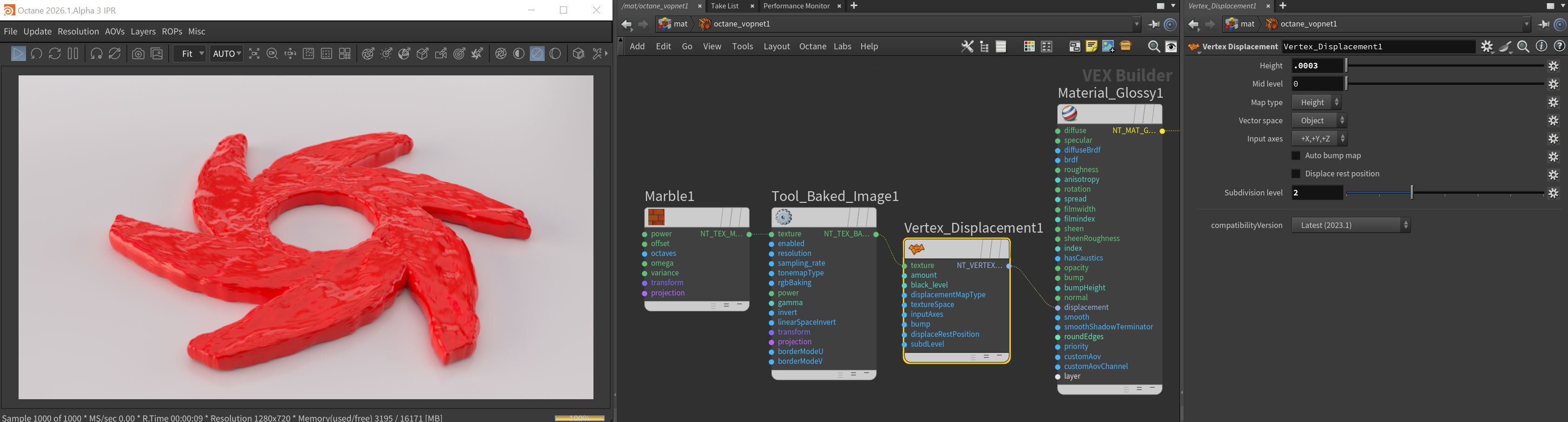
Figure 1: A Vertex Displacement node connected to the Displacement input on a Glossy material
Vertex Displacement Parameters
Texture Pin - All texture types are supported, including Images, Procedurals, and OSL textures.
Height - The displacement height in meters.
Mid Level - The image value that corresponds to no displacement. The range is always normalized to [0,1]. Set this value to 0.5 for image textures that use 50% to represent no displacement.
Map Type - Choose between Height maps and Vector Displacement maps.
Vector Space - Valid when Map Type is set to Vector Displacement.
Input Axes - Vaild for object space vector maps. The input axes provide information about how to interpret RGB data. The selected axes are then converted to Octane XYZ space during displacement.
Auto Bump Map - Generates an Automatic bump map to achieve fine details without requiring high subdivision levels. Only supports Height displacement maps.
Displacement Rest Position - Activates displacement at the rest position.
Subdivision Level - The subdivision level applied to polygons using this material. Overrides the subdivision level set in Geometry preferences. Higher subdivision levels achieve greater displacement detail, but can also increase rendering and pre-processing times.
Compatibility Versions - The Octane version that the behavior of this node should match.