Cinema 4D Noise
The Cinema 4D Noise node is for using Cinema 4D's Noise shaders. Recent versions of OctaneRender® added OSL versions of the Cinema 4D noises. The Octane Noise node is a native tool and very efficient. For speed and reliability, the Octane Noise node is the better first choice, with the Cinema 4D Noise node as a fallback as needed.
|
|
Cinema 4D Noise
|

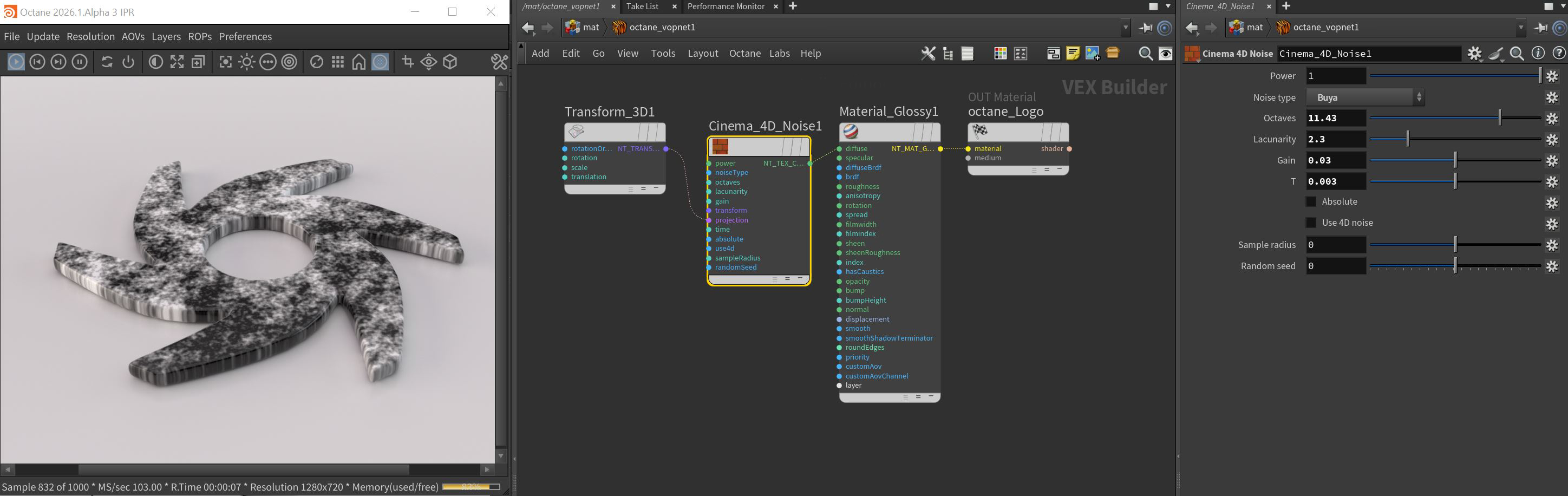
Figure 1: The Buya Noise Type for a Cinema 4D Noise node connected to the Diffuse input of a Diffuse material
Cinema 4D Noise Parameters
Power - Determines the strength/brightness of the texture.
Noise Type - There are 31 different noise types availabe from this dropdown menu.
Octaves - Sets the scale of the detail in the noise.
Lacunarity - Determines the amount of additional detail for every octave.
Gain - This value will make the noise brighter or darker.
T - This value sets the state of the noise by time. To animate the effect, you will need to set beginning and ending time values by keyframe.
Absolute - Sets the absolute value of the noise.
Use 4D Noise - Switches between 2D and 4D noise.
Sample Radius - The radius to use for the noise.
Random Seed - The seed value for a unique noise pattern.