Capture to Custom AOV
The Capture to Custom AOV node can be used to apply a texture to a custom AOV pass (figure 1). Once a Capture to Custom AOV node has been connected to a material network, the custom AOV needs to be activated in the AOVs tab for the Octane Render Target. See the section on AOVs for more information on using the Octane AOV passes.
|
|
Capture to Custom AOV
|
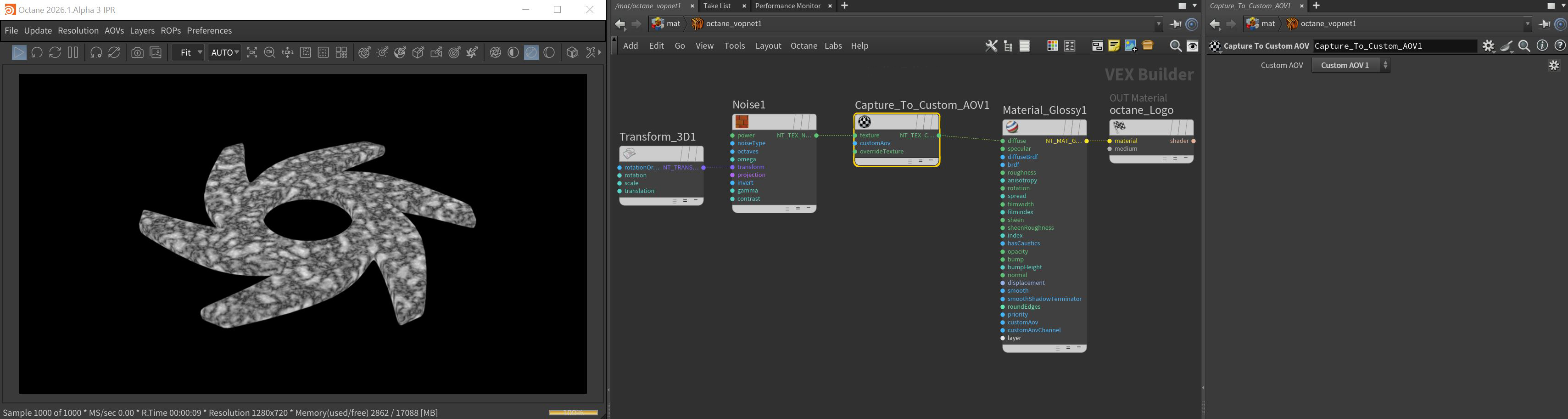
Figure 1: A Procedural Noise node is used with the Capture to Custom AOV node to add the noise pattern to the AOV matte
Capture to Custom AOV Texture Attributes
Texture Pin - The texture that is being captured and written to the custom AOV and forwarded to the destinations of the capture texture node.
Custom AOV - Specifies the custom AOV for the texture to be written to.
Override Texture Pin - The texture specified here will be recorded in the custom AOV but the captured texture is still what is forwarded to the destination of the capture node.