AOVs (Render AOVs)
AOVs, otherwise known as Render Passes segregates the different aspects of the scene, rendering each aspect across multiple images. This is useful in fine-tuning projects, compositing, and creating detailed and photorealistic images.
To instruct OctaneRender® to include a particular pass, go to the Octane Render Target node and click on the AOVs tab to select the pass (Figure 1).
|
|
AOVs
|
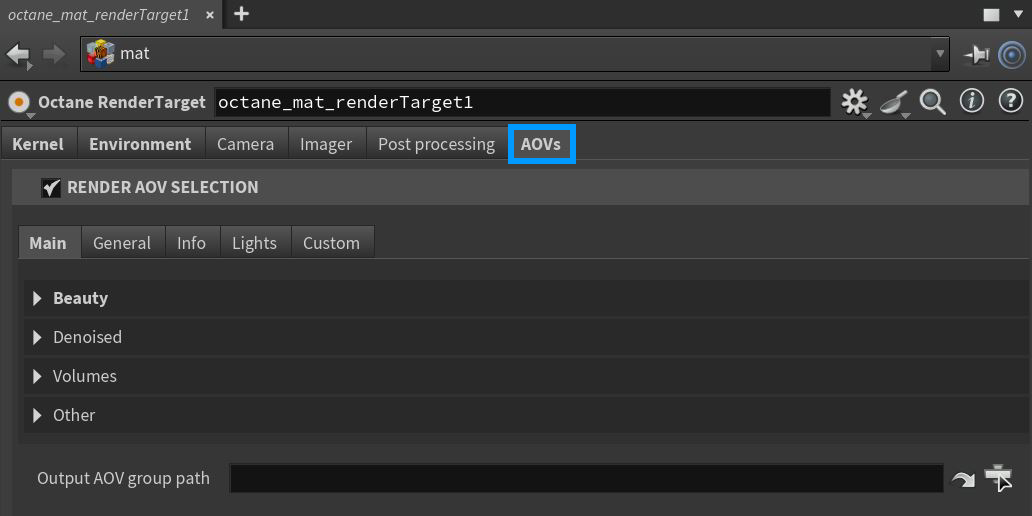
Figure 1: The Render Passes tab in an Octane Render Target node
AOV Parameters
Main Tab
The Main AOVs are classified into the following sub-categories:
- Beauty
- Denoised
- Volumes
- Other
General Tab
The General AOVs are classified into the following sub-categories:
- Auxillary
- Cryptomatte
- Render Layers
Info Tab
The Info section contains AOVs that can capture geometric data provided in the scene. There is a general settings tab for the info channel AOVs as well.
Lights Tab
The Lights AOVs are classified into the following sub-categories:
- Light
- Direct
- Indirect
Custom Tab
The Custom AOVs are classified into the following sub-categories:
- Custom
- Global Texture