Channel picker
The Channel Picker node can be used to isolate either the red, blue, or green channel from an incoming texture map. In figure 2, the Channel Picker node is used to isolate only the incoming red channel data for the plane on the right, resulting in greyscale output.
|
|
Channel Picker
|
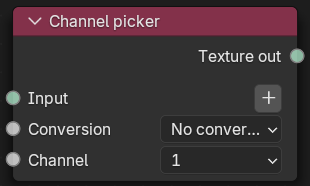
Figure 1: Channel picker Node
|
|
Channel Picker
|

Figure 2: A Channel Picker node example
Channel Picker Parameters
Input - Specifies the image for the operation.
Conversion - Color space conversion applied to the input texture.
Channel - The color channel to pass through to the output texture.