Apply gamma curve
The Apply Gamma Curve node provides adjustment to the gamma.
|
|
Gamma Curve
|
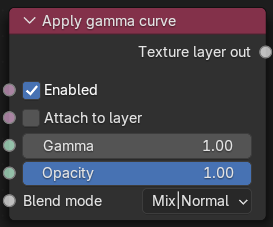
Figure 1: Apply gamma curve Node
Adjust Gamma Curve Parameters
Enabled - Whether this layer is applied or skipped.
Attach to layer - When selected, this layer modifies the input of the next lower layer that is not itself attached to a layer. Otherwise, it applies to the output of the next lower layer.
Gamma - The gamma value used. The equation applied is: output = pow(input, 1/gamma).
Opacity - The opacity channel used to control the transparency of this layer.
Blend mode - The blend mode used to mix the RGB values of this layer with those of the background.