Unary Math Operator
The Unary Math Operation node takes a single input and performs a selected mathematical calculation on the data (figure 1).
|
|
Unary Math Operation
|

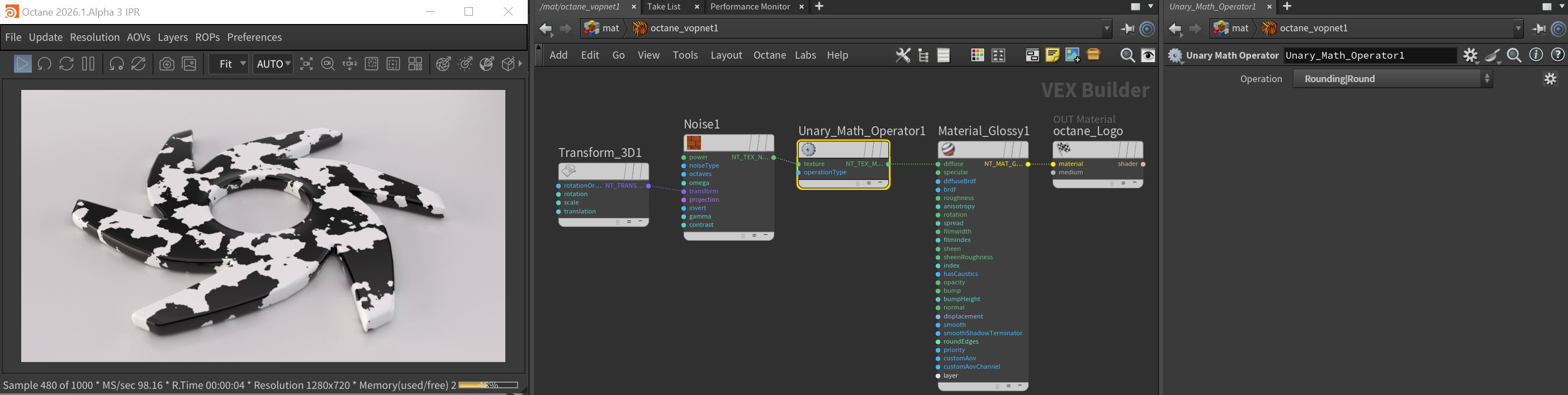
Figure 1: A Noise texture's contrast has been increased using the Round operation available with the Unary Math Operation node
Unary Math Operation Parameters
Argument - The argument for the operation.
Operation - The calculation to be performed on the arguments.
- There are fifteen Functions:
- Absolute Value
- Exponential [2^x]
- Exponential [e^x]
- Exponential [e^x-1]
- Fraction
- Inverse square root
- Invert
- Logarithm Base 10
- Logarithm Base 2
- Logarithm Base e
- Logarithm Base radix
- Negate
- Reciprocal
- Sign
- Square Root
- There are two Conversion operations:
- Degrees
- Radians
- There are four rounding operations:
- Round
- Round Down
- Round Up
- Truncate
- There are nine trigonometric operations:
- Arc Cosine
- Arc Sine
- Arc Tangent
- Cosine
- Hyperbolic Cosine
- Hyperbolic Sine
- Hyperbolic Tangent
- Sine
- Tangent
- There are two Vectors:
- Length
- Normalize