Triplanar
The Triplanar procedural texture works in conjunction with a Triplanar projection. The Triplanar projection takes the coordinates in world or object space and it picks the projection axis, depending on the active axis of the Triplanar texture. This gives a quick way to map a texture on any object, and presents the possibility for texture transforms local to each projection axis. The Triplanar texture has six input pins representing the positive and negative x, y, and z planes. The same or different texture nodes can map to each of these input pins. In Figure 1, a Checks, Ridged Fractal, and Color RGB node are attached to the six texture position inputs (TexturePosX, TextureNegX, TexturePosY, TextureNegY, TexturePosZ, TextureNegZ) of the Triplanar node.
|
|
Triplanar Texture
|

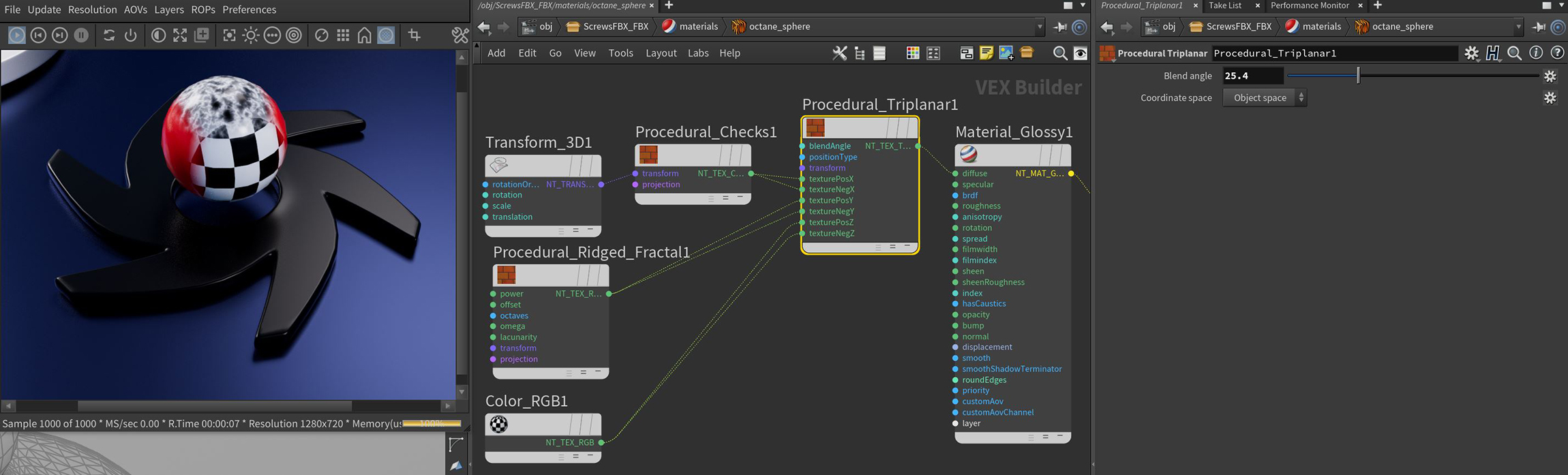
Figure 1: The node network for the textures mapped to the sphere using the Triplanar Map node
Triplanar Parameters
Blend Angle - The angle on an edge to blend two adjacent textures.
Coordinate Space - The orientation (Object or World) used for the texture blending.
Use Rest Attributes - Rest positions and normals will be used when blending, if provided.
Transform Pin - Controls the Triplanar textures through a connected Transform node.
Positive And Negative Axes - Specifies the Procedural or Image textures assigned to these axes.