Chaos
The Chaos texture node randomly scatters an input texture over a surface or UV space (figure 1). This node can be used to hide seams of image textures not intended for seamless use.
|
|
Chaos
|
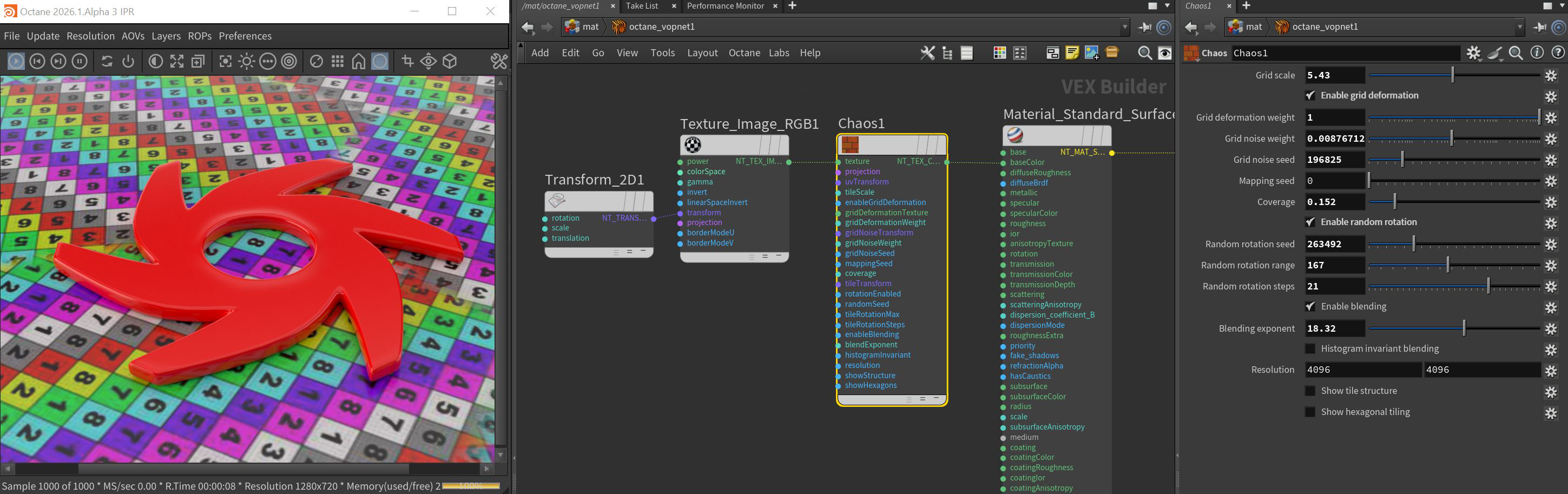
Figure 1: The Chaos node and it's associated parameters
Chaos Parameters
Texture Pin - This is the slot where textures are assigned. Procedural textures produce some interesting results.
Projection Pin - Adds a Projection node that will affect the texture projection across the entire UV space as a whole.
UV Transform Pin - Adds a UVW Transform node that will transform the entire UV space as a whole.
Grid Scale - Determines the size of the image as it is tiled across the surface or UV space.
Enable Grid Deformation - Toggles the deformation of the tiles according to the following inputs.
- Grid Deformation Weight - Magnitude of the bias coming from the deformation texture.
- Grid Noise Weight - Determines the magnitude of bias coming from the internal noise used to deform the grid.
- Grid Noise Seed - The seed to randomize the internal noise used to deform the grid.
- Mapping Seed - Seed used to randomize the area of the source texture used for each tile.
- Coverage - This control moves the image on U and V within the tile space. Use the Show Tile Structure toggle to see how the images are actually applied.
Enable Random Rotation - Toggles the rotation of the tiles according to the following inputs.
- Random Rotation Seed - Sets the Seed value for the random rotations.
- Random Rotation Range - Maximum amount of rotation applied to individual tiles.
- Random Rotation Steps - Number of possible values taken by the random rotation over the range. A value of 0 disables stepped rotation.
Enable Blending - Toggles the blending of the tiles according to the following inputs.
- Blending Exponent - Controls the exponent for exponentiated blending.
- Histogram Invariant Blending - Adjusts the output texture histogram closer to the input texture histogram.
Resolution - Specifies the X and Y resolution of the actual Chaos texture created by the node.
Show Tile Structure - Toggle this control to see the structure of how the chaos pattern flows. This will show the actual triangles of the mesh, with some triangles containing portions of the image and others being black.
Show Hexagonal Tiling - Toggle this control to see the structure of how the hexagonal pattern flows.