Spotlight
The Spotlight node can be used with an Octane Area Light or as part of an emission material on a polygon to create a realistic spotlight behavior, without the need of an IES texture (figure 2).
|
|
Spotlight
|
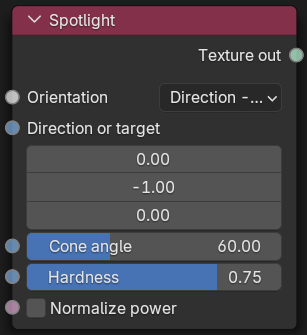
Figure 1: Spotlight Node
|
|
Spotlight
|

Figure 2: An emissive cube using the Spotlight node
Spotlight Parameters
Orientation- Determines how the cone will be oriented; the choice will use the coordinates in the Direction or Target edit fields.
Direction or Target - The direction of the light or the target object.
Cone Angle - The angle of the actual cone. Smaller values produce a tighter cone.
Hardness - Sets the hardness of the penumbra (cone) boundaries. Lower values produce a softer look.
Normalize Power - Keeps the emitter angle constant when the angle changes.