Orbx Properties
The ORBX file format is the best way to transfer scene files from 3D Authoring software programs that use the Octane Plug-in such as Octane for Maya, Octane for Cinema 4D, or OctaneRender® Standalone (figure 1). This format is more efficient than FBX when working with Octane specific data as it provides a flexible, application independent format. ORBX is a container format that includes all animation data, models, textures etc. that is needed to transfer an Octane scene from one application to another.
|
|
ORBX PRoperties
|

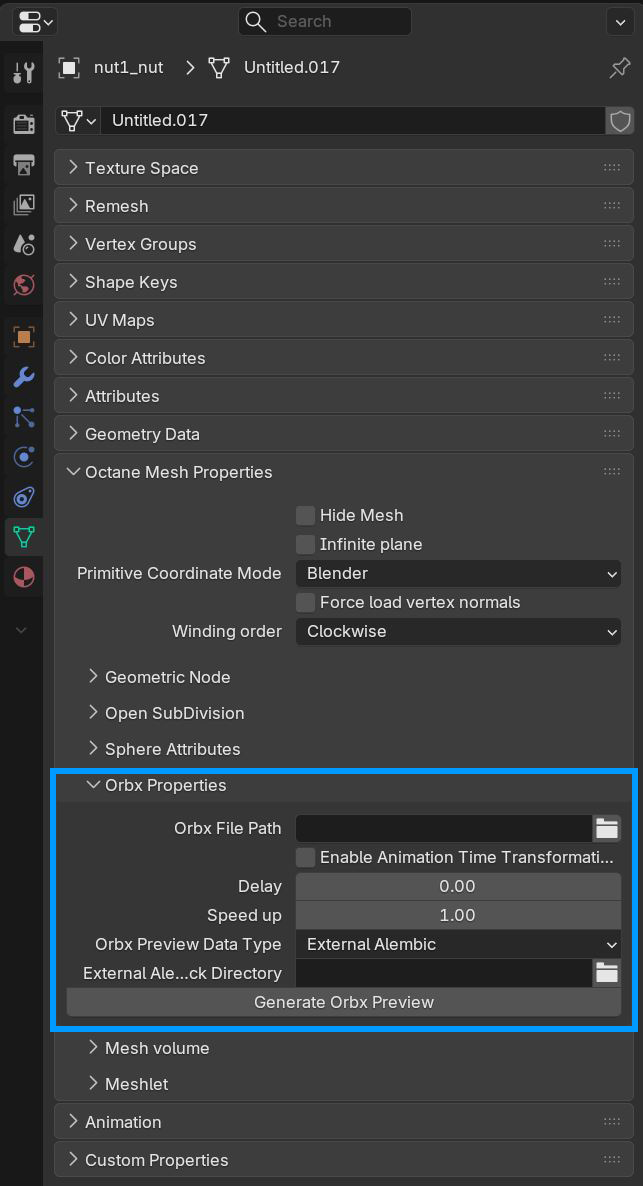
Figure 1: ORBX Properties
ORBX Properties
Orbx File Path - Orbx file location to import.
Enable Animation Time Transformation - Allows offsetting and scaling of ORBX proxy animations.
Delay - The offset of the animation start in seconds.
Speed Up - The scale of the animation speed. e.g. - 1 is normal playback, 2 is 2x faster.
Orbx Preview Data Type - The data type to display the geometry in the viewport. For animated mesh, use External Alembic (default).
External Alembic Asset Unpack Directory - If External Alembic is selected, this option allows you to unpack the alembic file to a specific directory.
Generate Orbx Preview - The current mesh data will be replaced with the preview data. The current object's delta matrix may be updated according to the orbx settings.