Open SubDivision
Properties in this section are used to define how the object will handle SubDivision (figure 1).
|
|
Open SubDivision
|

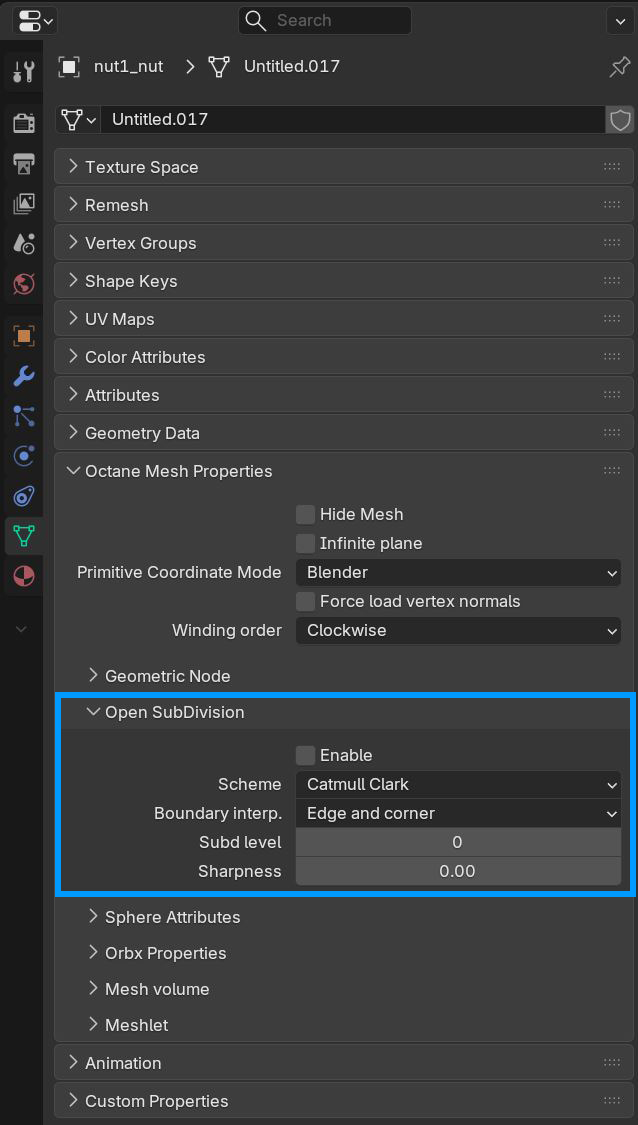
Figure 1: Open SubDivison Parameters
Open SubDivision Parameters
Enable - Activate OpenSubDiv
Scheme - Select one of the OpenSubdiv subdivision scheme classes, which provides the methods for computing the various sets of weights used to compute new vertices resulting from subdivision.
- Catmull-Clark - A uniform refinement is applied to the Mesh faces. It subdivides the Mesh by the same amount.
- Loop - Subdivision scheme for triangular meshes, where each recursively defined subdivision surface divides into smaller ones.
- Bilinear - Subdivision scheme where the limit surface goes through the existing vertices, resulting in softened edges but no drastic changes in shape.
Subd Level - Allows subdivision surface refinement based on Pixar’s OpenSubDiv implementation. Controls the number of times OctaneRender subdivides the original version of the Mesh.
Sharpness - Controls the Sharpness values for the crease at and around a vertex. Crease sharpness values range from 0 (smooth) to 10 (infinitely sharp).