Object Layer
The Object Layer provide parameters to control both the objects and the shadows it casts on other geometry. Additionally, this provides a way to modify the object visibility in the viewport at render time (figure 1).
|
|
Object Layer
|

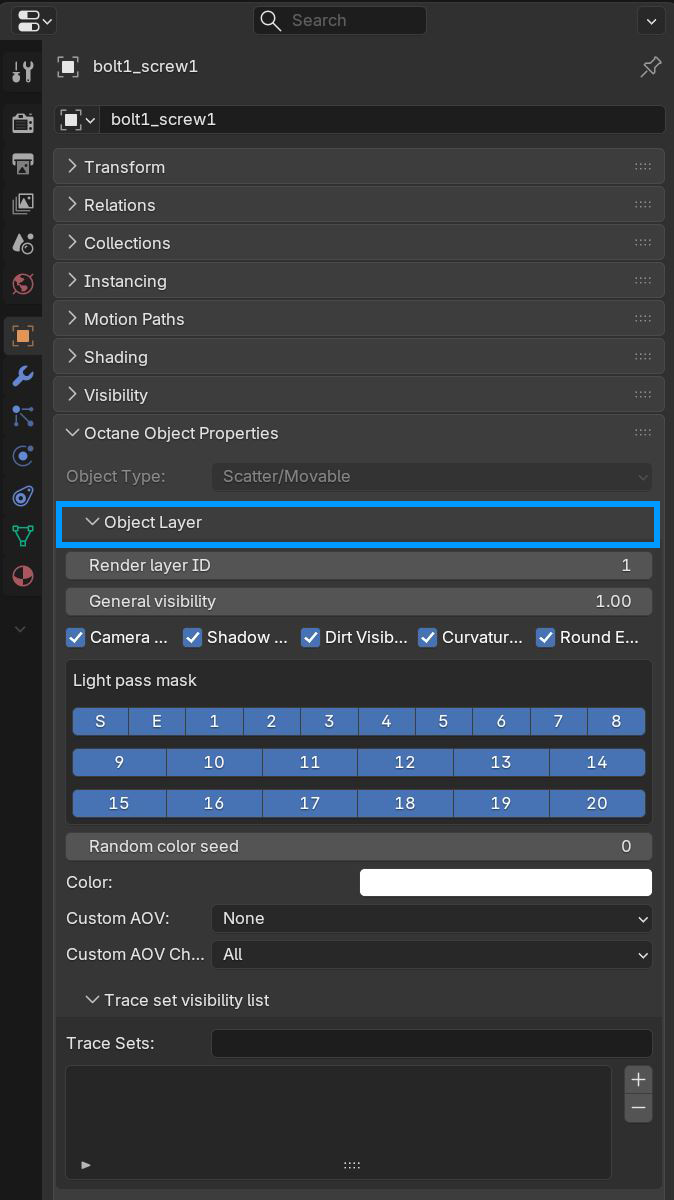
Figure 1: Object layer parameters
Object Layer Parameters
Render Layer ID - This specifies the layer to place the object on. The value provided assigns the object to the corresponding render layer. This is the first render layer by default.
General Visibility - This controls the level of visibility for both the object and its shadow.
Camera Visibility - Takes a boolean value to specify if the object is visible to the camera. This is enabled by default.
Shadow Visibility - Takes a boolean value to specify whether the shadow cast by the object is visible to the camera. This is enabled by default.
Dirt Visibility - If enabled, the mesh will affect other meshes that are using a Dirt texture. If disbaled, any Dirt texture node will ignore that mesh.
Curvature Visibility - If enabled, the Curvature node affecting the geometry will be visible.
Round Edges Visibility - If enabled, the Round Edges node affecting the geometry will be visible.
Light Pass Mask - Determines which light pass IDs will contribute to the illumination of the object for which this node is attached.
Random Color Seed - Specifies the start point to initialize the color after which random colors are generated. This is 0 by default when random colors are not in use.
Color - The color used for the assigned object when it is rendered in the object render layer pass.
Custom AOV - Writes a mask to the corresponding Custom AOV present in or attached to the Render Target node.
Custom AOV Channel - Determines which channels will receive the custom AOV mask.
Trace Sets - The Trace Set system allows for greater control over including or excluding scene data from object surfaces when light hits the surface.