Deep Image Rendering
The goal of deep image rendering is to improve the compositing workflow by storing Z-depth with samples. It works best in scenarios where traditional compositing fails, like masking out overlapping objects, working with images that have depth-of-field or motion blur, or compositing footage in rendered volumes. Most major compositing applications support deep image compositing. The disadvantage of deep image rendering is the large amounts of memory required to render and store deep images. The standard output format is OpenEXR.
Instead of having single rGBA values for a pixel, a deep image stores multiple RGBA channel values per pixel together with a front and back Z-depth (Z and ZBack channels, respectively). This tuple (R, G, B, A, Z, ZBack) is called a deep sample. Deep samples come in two flavors: point samples, which have a front depth specified (Z >= ZBack) and volume samples, which have a front and a back depth (Z < ZBack). Hard surfaces visible through a pixel are point samples, and visible volumes are volume samples. From these samples, two functions can be calculated: A(Z) and C(Z), representing the alpha and color of the pixel not further away than Z. These two functions are the basis of depth compositing, and allow you to compose footage together at any distance Z instead of just composing image A over image B. These functions are calculated by the compositing application - OctaneRender® just calculates the samples. You can read a more thorough explanation at the fxguide.com article called "The Art Of Deep Compositing" (https://www.fxguide.com/?p=48850) along with "Interpreting OpenEXR Deep Pixels" and "Theory of Deep Samples".
Working with Deep Image Rendering in Octane for Blender
Deep render AOVs work with Deep Image rendering in the Direct Lighting, Path Tracing, and Photon Tracing kernels. When enabled, all render passes enabled in the Render AOVs node are written to the deep pixel channels. By default, only the beauty AOV is written. Deep image parameters can be accessed from the Deep Image rollout in the Kernel parameters (figure 1).
|
|
Deep Image
|

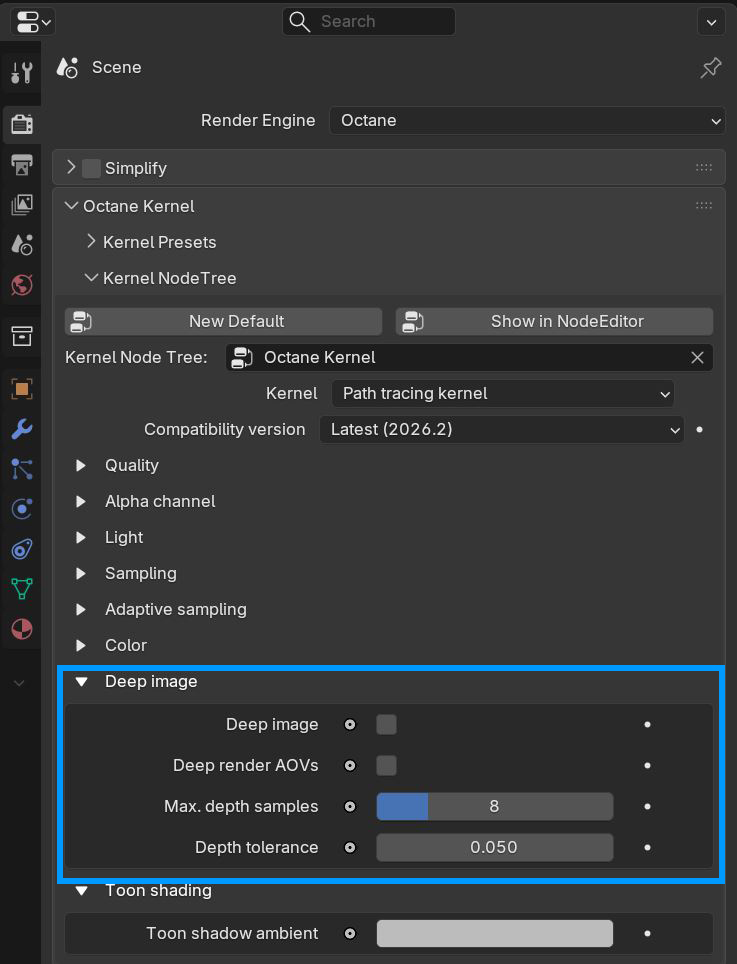
Figure 1. Deep Render AOVs are enabled through the Kernel node
|
NOTE: Enabling this feature can use a lot of VRAM if you are rendering a large image. |
Deep Image Parameters
Deep Image - Enables deep image rendering.
Deep Render AOVs - Includes render AOVs for deep image pixels.
Max. Depth Samples - Specifies an upper limit for the number of deep samples stored per pixel.
Depth tolerance - Specifies a merge tolerance - i.e., when two samples have a relative depth difference within the depth tolerance, they merge.
For a typical scene, the GPU renders thousands of samples per pixel. However, VRAM is limited, so it's necessary to manage the number of samples stored with the Deep AOVs and Max. Depth Samples parameters.
Deep Bin Distribution Calculation
The maximum number of samples per deep pixel is 32, but we don't throw away all the other samples. When we start rendering, we collect a number of seed samples, which is a multiple of Max. Depth Samples. With these seed samples, we calculate a deep bin distribution, which is a good set of bins characterizing the various depth depths of the pixel's samples. There is an upper limit of 32 bins, and the bins are non-overlapping. When we render thousands of samples, each sample that overlaps with a bin is accumulated into that bin. Until this distribution is created, you can't save the render result, and the Deep Image option in the Save Image dropdown is disabled.
Limitations
Using deep bins is just an approximation, and there are limitations to this approach. When rendering deep volumes (meaning a large Z extend), there might not be enough bins to represent this volume all the way to the end, which cuts the volume off in the back. You can see this if you display the deep pixels as a point cloud in Nuke®. You can still use this volume for compositing, but up to where the first pixel is cut off. If there aren't enough bins for all visible surfaces, some surfaces can be invisible in some pixels. This situation is more problematic, and the best option is to re-render the scene with a bigger upper-limit for the deep samples.
After creating the deep bin distribution, you need to upload it onto the devices for the whole render film. Even with tiled rendering, deep image rendering uses a lot of VRAM, so don't be surprised if the devices fail when starting the render. The amount of buffers required on the device can be too big for the configuration - check the log to make sure. The only thing you can do here is reduce the Max. Depth Samples parameter or the resolution.
Here is an example project and a deep OpenEXR file rendered with it: deep-image-example.zip