Displacement
Displacement nodes use textures and procedural shaders to generate geometry during render time. This allows for the building of simpler base shapes and use materials to add complexity and detail. OctaneRender® is known for easy and fast displacement and developments have continue to expand displacement capabilities. As a result, there are two types of displacement available in OctaneRender: Texture displacement and Vertex displacement (figure 1).
|
|
Displacement Nodes
|
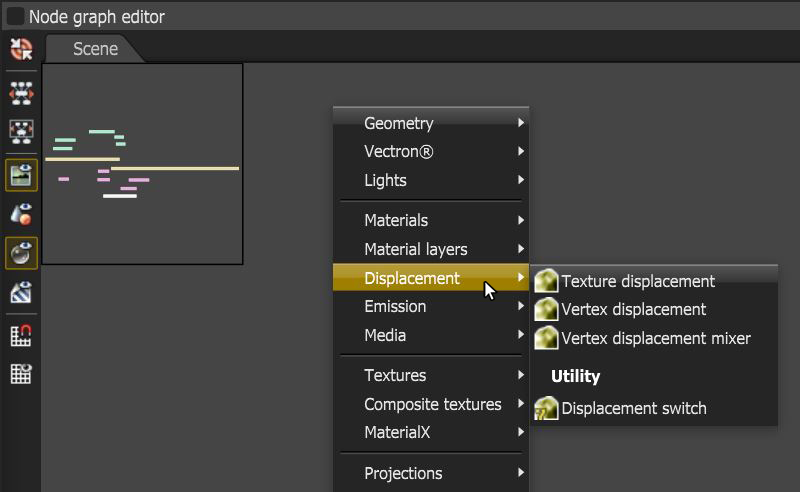
Figure 1: The Displacement category
Texture Displacement
This displacement method is the original displacement offered by OctaneRender. Texture displacement is a fast, high fidelity voxel-based displacement. Texture displacements are single axis displacements, displacing as height for a given polygon. For omni-directional vector displacements (displacements that allow for undercuts and overhangs, such as those generated within ZBrush) use Vertex displacement instead.
Texture displacement is limited to image textures only, no procedural textures are allowed, though the Baking texture node can be used to get around that limitation. Just note that the procedural texture will be limited to the resolution specified in the Baking texture node and will not be resolution independent.
Vertex Displacement
Vertex Displacement differs from Texture Displacement in numerous ways. Vertex Displacement requires subdivisions to work. The higher the mesh resolution, the better the results. Note that the Displacement node's Subdivision Level parameter will do the subdivision on the GPU, which will improve the time it takes to load the asset onto the GPU — as opposed to subdividing the mesh prior to adding the Vertex displacement node. Vertex displacement also supports omni-directional vector displacements, motion blur, and deforming objects.